Microsoft Fabric workspaces don’t exist in ARM. Bicep’s new Local Extension SDK means that’s no longer a wall, just a gap I could build my way across.
Fabric keeps coming up on the data platform side of my day job, and every time it does I hit the same seam: half of it is a normal Azure resource, and half of it just isn’t. I went looking at Terraform’s microsoft/fabric provider a while back to understand why it exists as a second provider alongside azurerm, and the answer stuck with me. When I later found Bicep’s local extension model, my first thought wasn’t "I should build something with this." It was "surely someone’s already wired this up for Fabric." Nobody had. That gap, and a Friday evening with nothing better to do, is basically the whole origin story for this post.
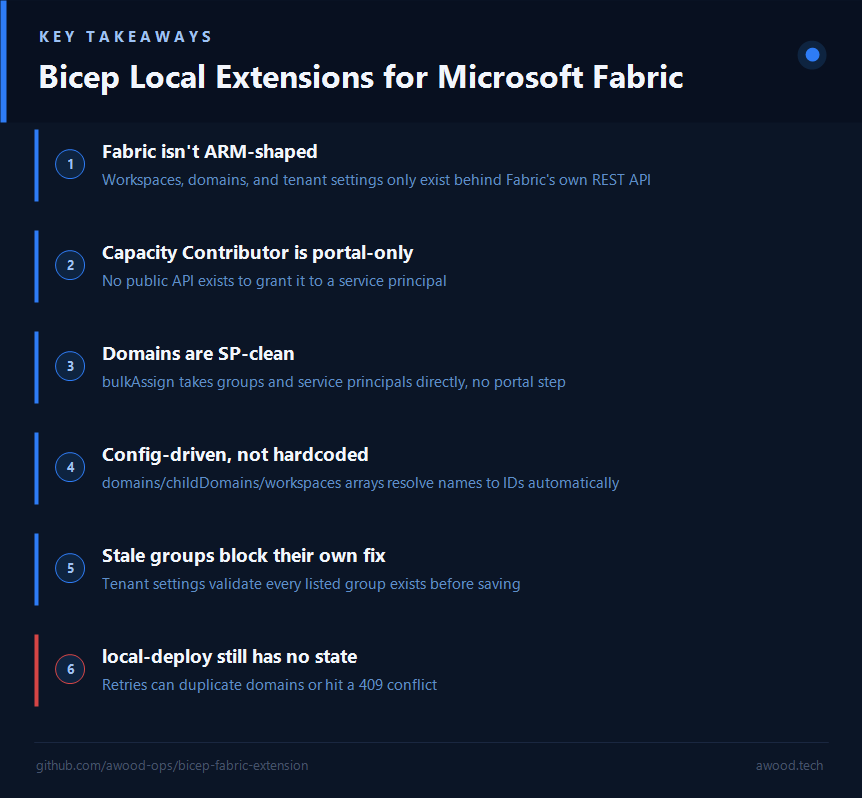
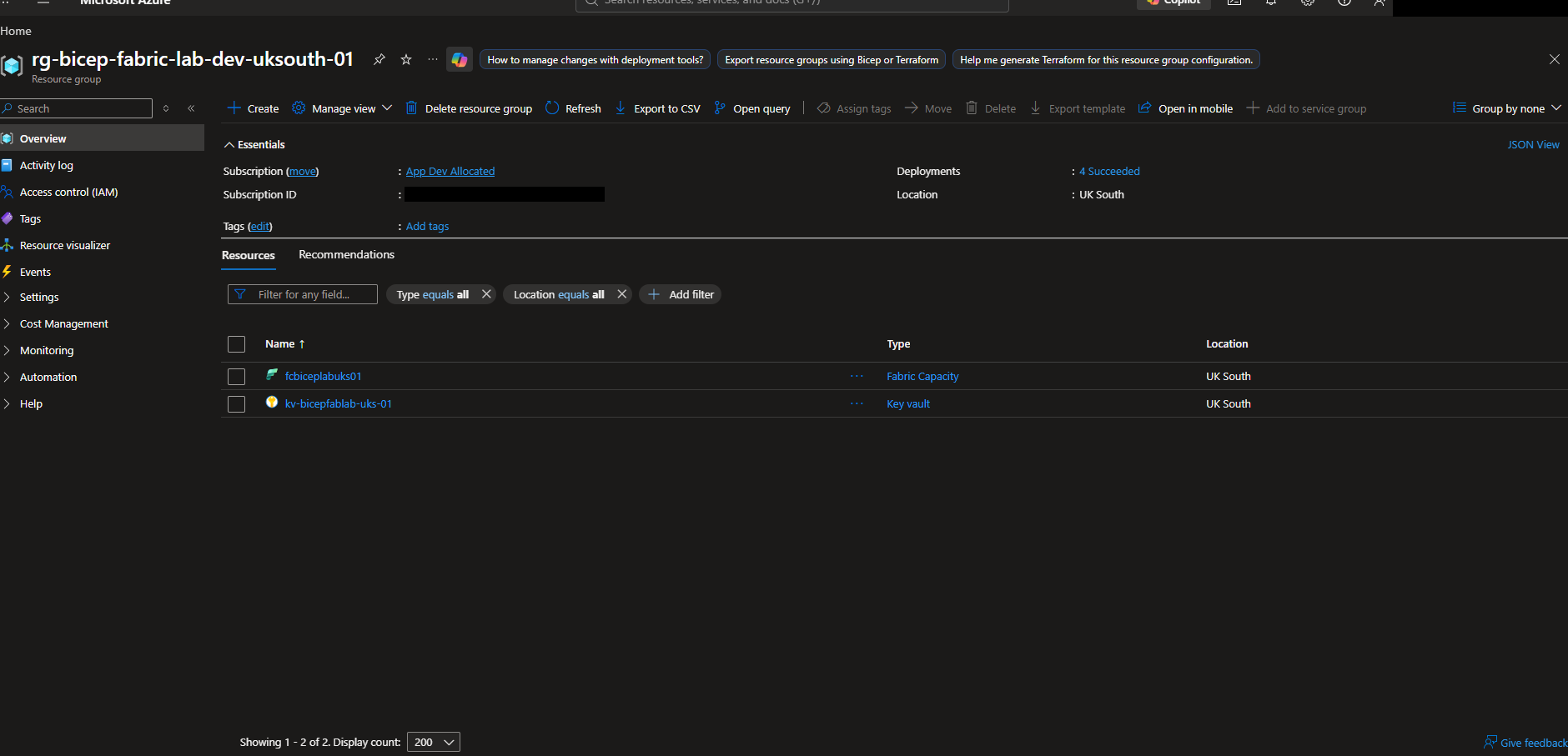
Microsoft Fabric has a split personality, and it’s one I ran into properly while looking at Terraform’s story for it. A Fabric capacity is a real ARM resource: it has a resource group, it bills through Azure, Azure RBAC applies to it. A Fabric workspace, lakehouse, or notebook is not. Those live entirely in Fabric’s own REST API surface, governed by the Fabric/Power BI admin model, with no Microsoft.Fabric/workspaces ARM resource type to declare in a normal resource block. It’s exactly why the official microsoft/fabric Terraform provider exists as a second provider alongside azurerm for the same platform: one control plane, two completely different APIs underneath it.
Bicep has no equivalent. If you want a workspace under source control today, you’re either scripting it outside Bicep entirely or reaching for Terraform’s second provider. That gap is what got me looking at Bicep’s Local Extension SDK.
What a Bicep local extension actually is
A local extension is a standalone binary that speaks the Bicep Extensibility Protocol, wired into a template the same way a normal provider is. Microsoft ships an official .NET NuGet package, Azure.Bicep.Local.Extension, that abstracts the protocol away: you subclass TypedResourceHandler<TProperties, TIdentifiers> and override whichever of Preview, CreateOrUpdate, Get, and Delete your resource actually needs, plus GetIdentifiers to tell Bicep what uniquely identifies an instance. Bicep handles the rest of the deployment lifecycle around it, running the extension locally on your own machine rather than through Azure Resource Manager.
Crucially, this isn’t theoretical. There’s already an experimental first-party HTTP extension shipped for making generic REST calls from inside a template, and the documented pattern for building your own is explicitly "author a small .NET extension that runs on your workstation and calls HTTP APIs." That’s exactly the shape of the Fabric REST API: authenticated HTTP calls against api.fabric.microsoft.com, no ARM involved.
Nobody’s built this yet
I went looking for whether this already exists before starting. It doesn’t. There’s an open GitHub issue on the Bicep repo (#12905) asking for exactly this, a Fabric provider for Bicep, opened in January 2024, still sitting in "needs more votes" territory with no roadmap commitment and no linked community extension. No blog post anywhere combines Bicep’s local extension model with Fabric specifically. As far as I can tell, this is open ground.
The other piece that used to make this a non-starter, service principal authentication against the Fabric API, isn’t a blocker anymore either, though it turned out to be a lot more nuanced than the GitHub issue thread assumed. More on that below.
Trying it for real
I scoped this deliberately small: a single resource type, Fabric workspace, with only Create and Delete implemented, no Update. That’s still the right call in hindsight. Even at that size, the parts that were slow weren’t the C#, they were the identity and permissions plumbing around it, which tells you something about where the actual complexity in a project like this lives.
The security model first
Before writing a line of the extension, I wanted the service principal calling Fabric to follow the same least-privilege shape you’d want in production, not a wildcard "let it do anything" setup. That meant, all declared as Bicep:
- Four Entra security groups, one per Fabric workspace role (
Admin,Member,Contributor,Viewer), using the Microsoft Graph Bicep extension (br:mcr.microsoft.com/bicep/extensions/microsoftgraph/v1.0:1.0.0). This is a second, separate extensibility mechanism from the local extension model, and a nice proof that "things outside ARM" is a pattern Microsoft is already investing in generally, not just something I was inventing for Fabric. - An app registration and service principal for the extension itself, also via the Graph extension.
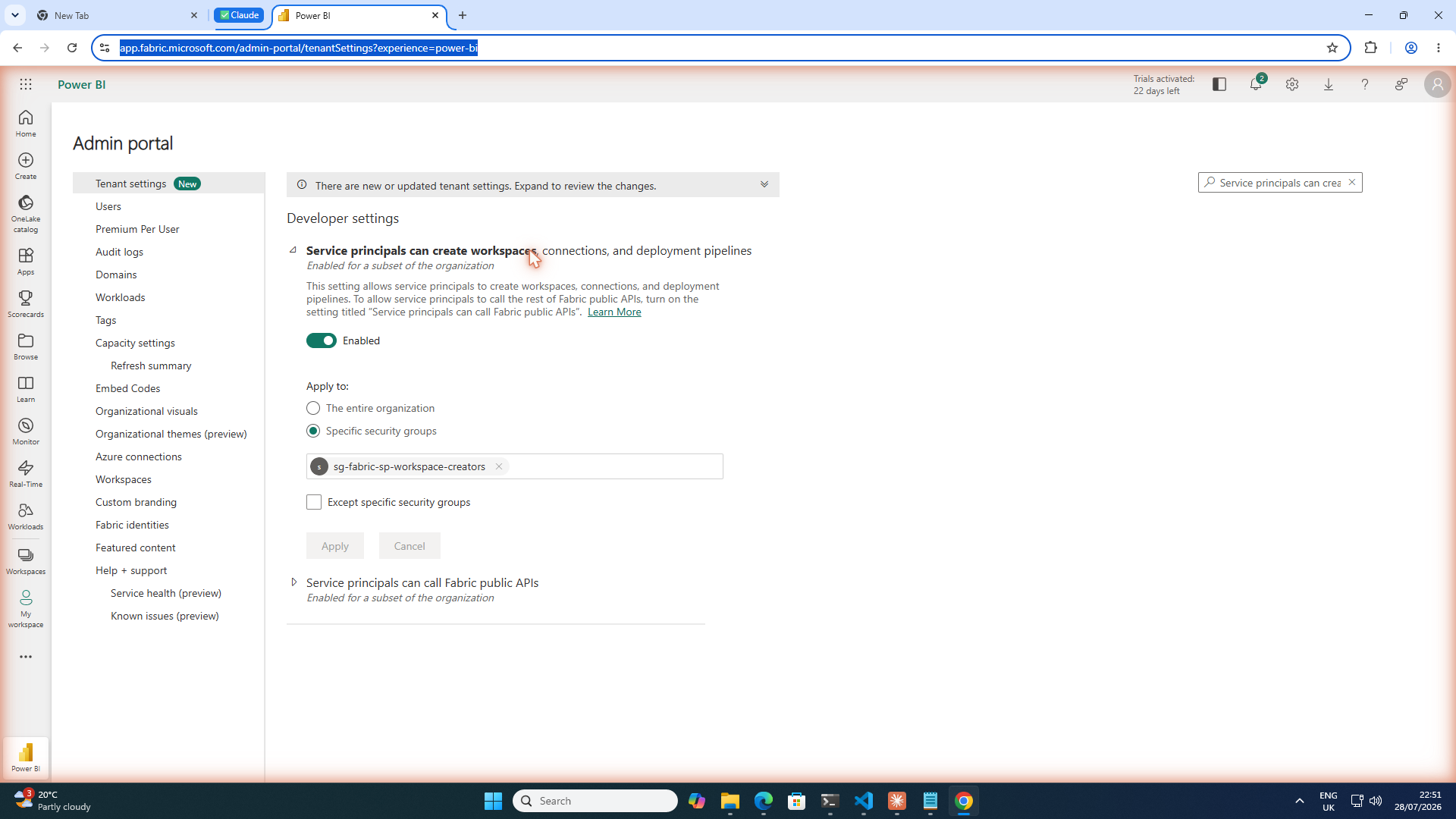
- A fifth group specifically to allow-list that service principal against the Fabric tenant setting that gates service-principal workspace creation.
- A Key Vault, RBAC-enabled, with the extension’s service principal granted
Key Vault Secrets User.
extension microsoftGraphV1

resource sgAdmin 'Microsoft.Graph/groups@v1.0' = {
  displayName: 'sg-fabric-${workspaceSlug}-admin'
  uniqueName: 'sg-fabric-${workspaceSlug}-admin'
  mailEnabled: false
  mailNickname: 'sg-fabric-${workspaceSlug}-admin'
  securityEnabled: true
  members: {
    relationships: [ labAdminObjectId ]
  }
}

resource fabricExtApp 'Microsoft.Graph/applications@v1.0' = {
  uniqueName: 'bicep-fabric-local-ext-lab'
  displayName: 'bicep-fabric-local-ext-lab'
}

resource fabricExtSp 'Microsoft.Graph/servicePrincipals@v1.0' = {
  appId: fabricExtApp.appId
}
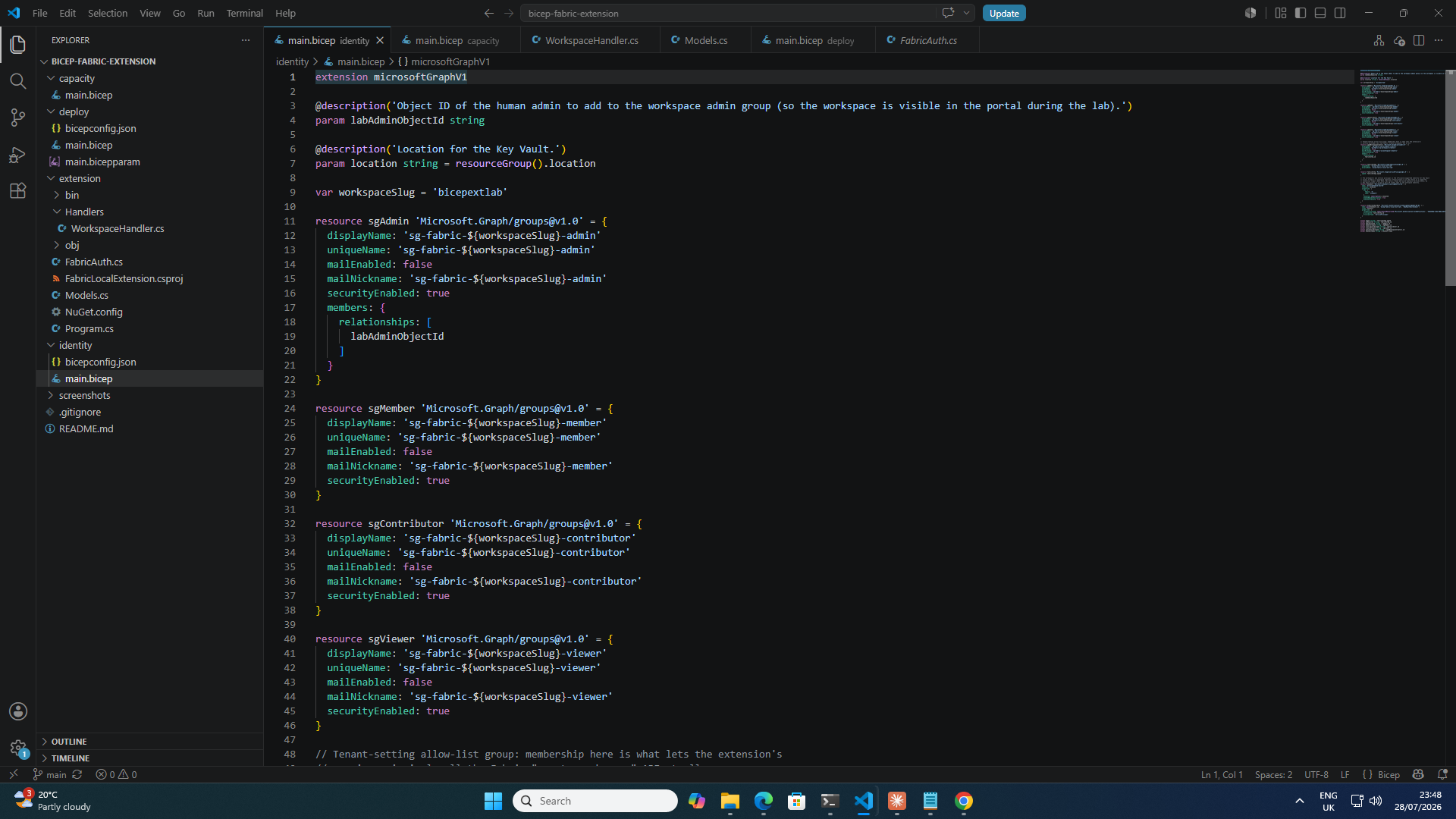
One honest caveat on the "CAF naming convention" framing I’d originally planned: I went looking for an official Cloud Adoption Framework abbreviation for Entra security groups and there isn’t one. CAF’s resource-abbreviations table is scoped to ARM resource types, and groups aren’t ARM resources. sg- is a widely used convention, not a documented standard, so I’m calling it that rather than dressing it up as more official than it is.
I deliberately didn’t try to wire Fabric’s own "workspace identity" feature (a per-workspace managed identity Fabric can provision) into the Key Vault story, even though it looks like the obvious fit at first glance. Its documented supported targets are ADLS Gen2, SQL Server, Azure Blobs, and Azure Analysis Services. Key Vault isn’t on that list, and Microsoft’s own community forum is explicit that the supported pattern for Key Vault access is a separate service principal, which is exactly what the extension already needed. I still provisioned the workspace identity later on to show the pattern (it’s a real, GA, group-addable Entra service principal, POST /v1/workspaces/{id}/provisionIdentity), just without pretending it does something it doesn’t.
The Fabric capacity, and a wasted first attempt
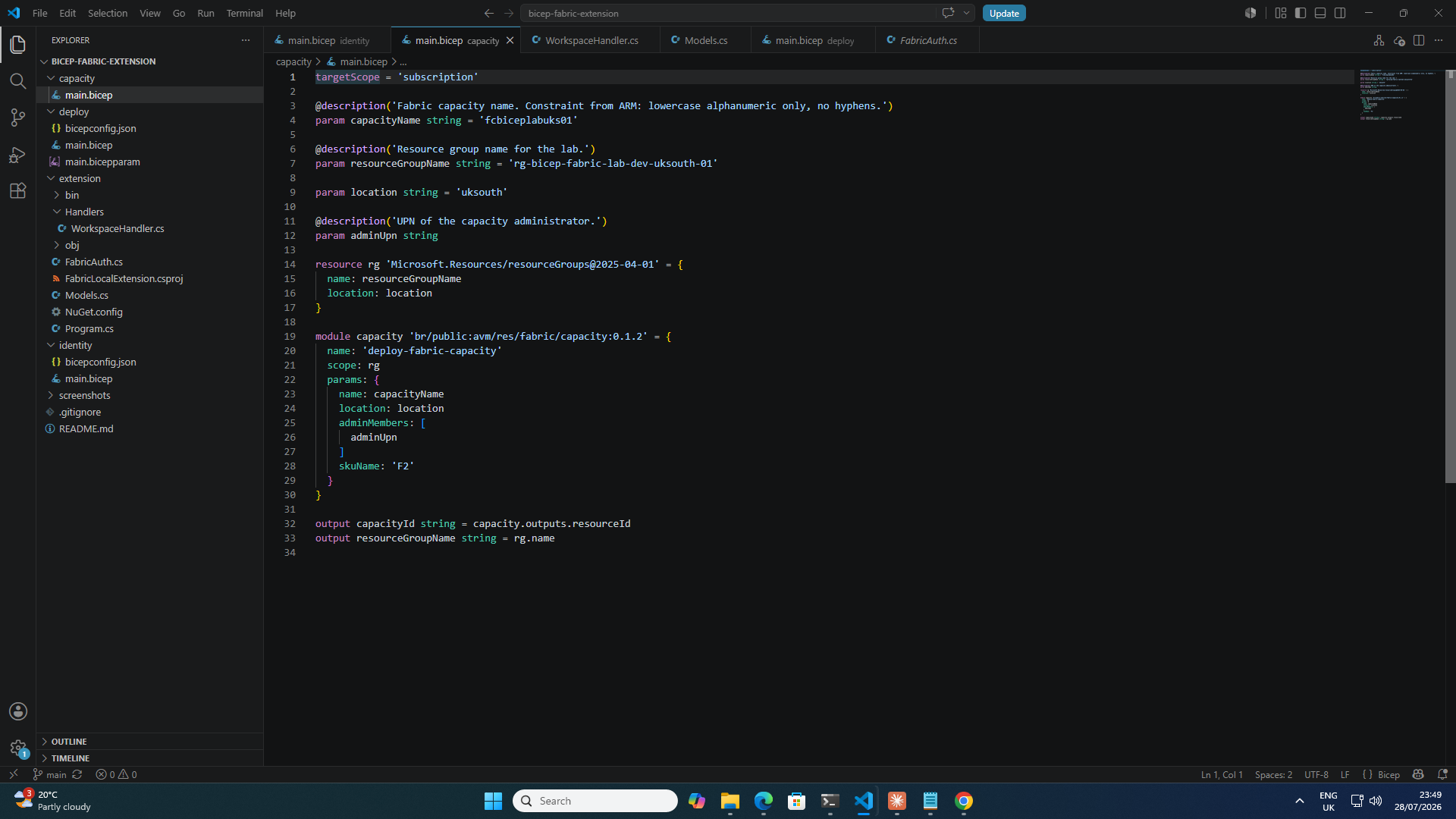
For the capacity itself I reached for the Azure Verified Module rather than a hand-rolled resource, br/public:avm/res/fabric/capacity:0.1.2. First attempt failed outright: I’d hand-written the resource against API version 2025-01-15-preview, which isn’t actually registered for uksouth:
NoRegisteredProviderFound: No registered resource provider found for
location 'uksouth' and API version '2025-01-15-preview' for type
'capacities'. The supported api-versions are '2022-07-01-preview, 2023-11-01'.
The AVM module pins to 2023-11-01, which is registered, and the switch fixed it in one go. A small thing, but it’s the kind of drift that’s easy to hit if you copy a resource definition straight out of the ARM template reference docs without checking it against what-if first.
One naming gotcha worth flagging: Microsoft.Fabric/capacities names are constrained to ^[a-z][a-z0-9]*$, lowercase alphanumeric only, no hyphens. Standard hyphenated CAF naming doesn’t fit, so mine ended up as fcbiceplabuks01 rather than something more readable.
Building and running the extension
The scaffold itself was the easy part, and Microsoft’s own quickstart in the Azure/bicep repo is a genuine working sample, not documentation-as-decoration:
public class WorkspaceIdentifiers
{
    [TypeProperty("The workspace display name...",
        ObjectTypePropertyFlags.Identifier | ObjectTypePropertyFlags.Required)]
    public required string DisplayName { get; set; }
}

[ResourceType("Workspace")]
public class Workspace : WorkspaceIdentifiers
{
    public string? Description { get; set; }
    public required string AdminObjectId { get; set; }
    public string? Id { get; set; }
}

public class WorkspaceHandler(IHttpClientFactory httpClientFactory)
    : TypedResourceHandler<Workspace, WorkspaceIdentifiers>
{
    protected override async Task<ResourceResponse> CreateOrUpdate(
        ResourceRequest request, CancellationToken cancellationToken)
    {
        var http = await GetAuthenticatedClientAsync(httpClientFactory, cancellationToken);
        var createBody = new
        {
            displayName = request.Properties.DisplayName,
            description = request.Properties.Description,
        };
        using var response = await http.PostAsJsonAsync($"{BaseUrl}/workspaces", createBody, cancellationToken);
        response.EnsureSuccessStatusCode();
        var created = await response.Content.ReadFromJsonAsync<WorkspaceApiResponse>(cancellationToken: cancellationToken)!;
        request.Properties.Id = created.Id;
        return GetResponse(request);
    }
    // ...Delete, GetIdentifiers, Preview
}
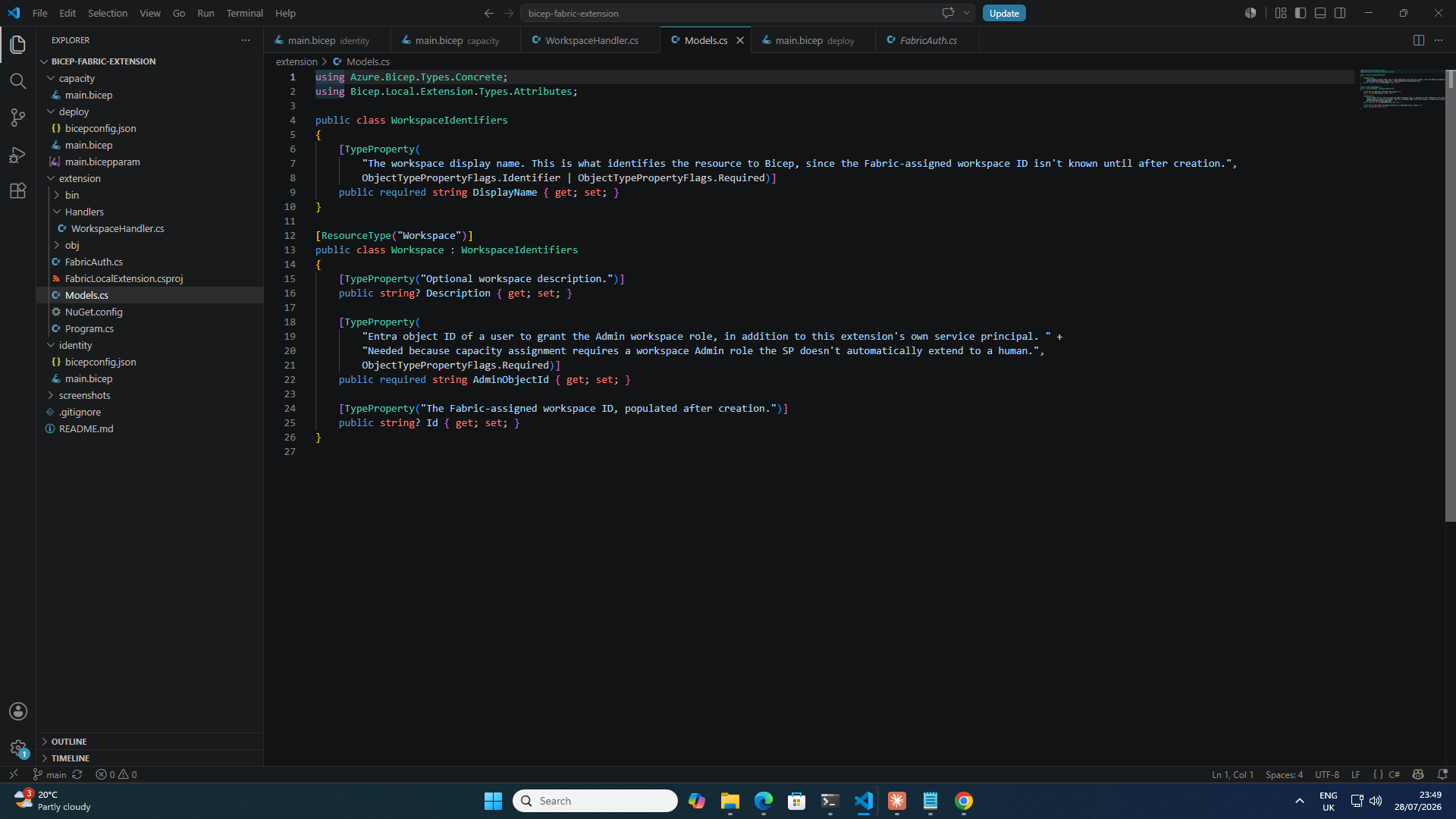
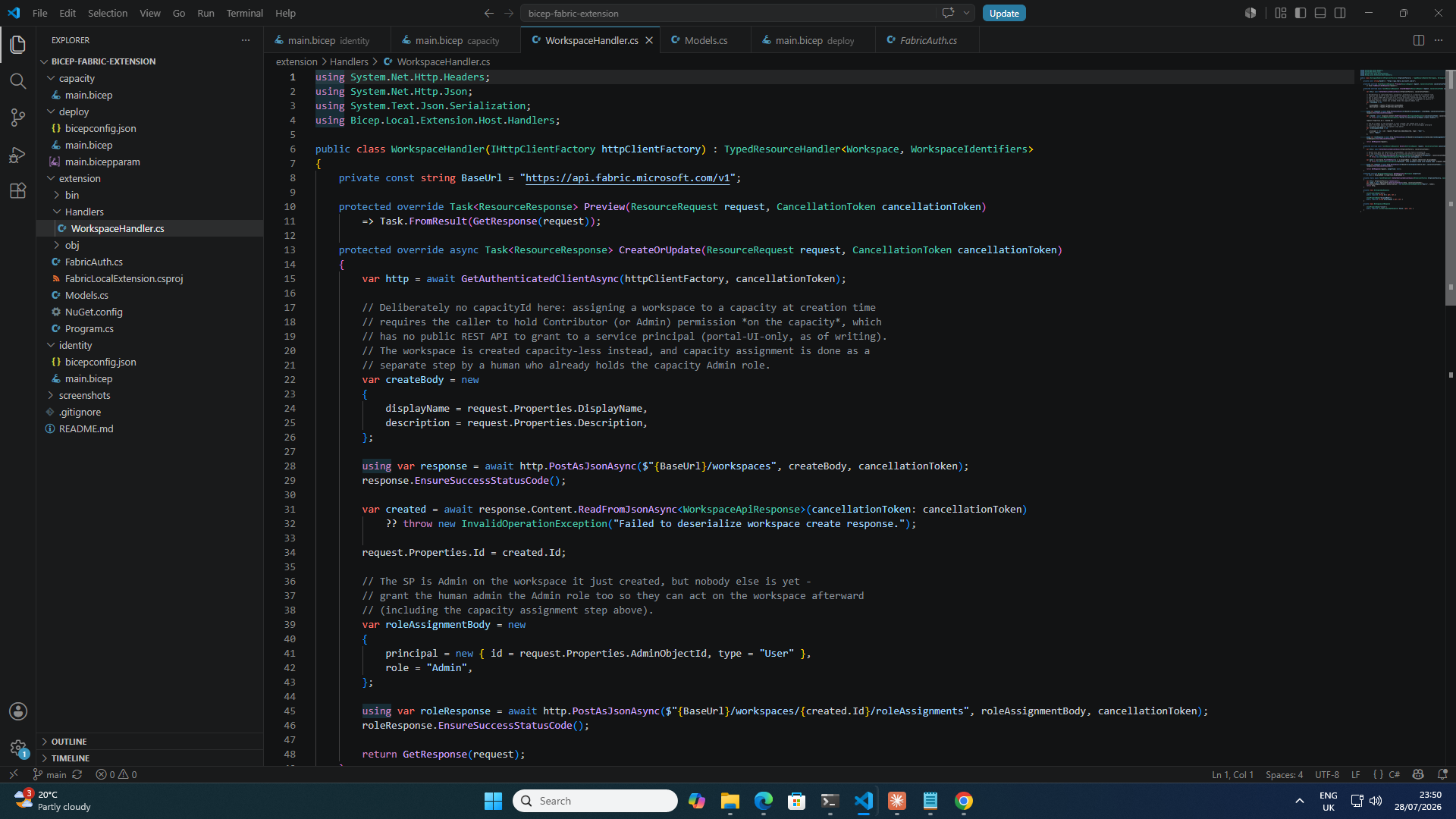
Two small drifts from the doc, worth noting for anyone following it verbatim: the package now targets net10.0 rather than net9.0 (the API tracks Bicep CLI releases closely, so pin to whatever version matches your installed CLI, not whatever a six-month-old blog post says), and AddBicepExtension is now flagged obsolete in favour of a fluent configuration API Microsoft hasn’t updated the public quickstart to use yet. It still compiles and runs, just with a warning.
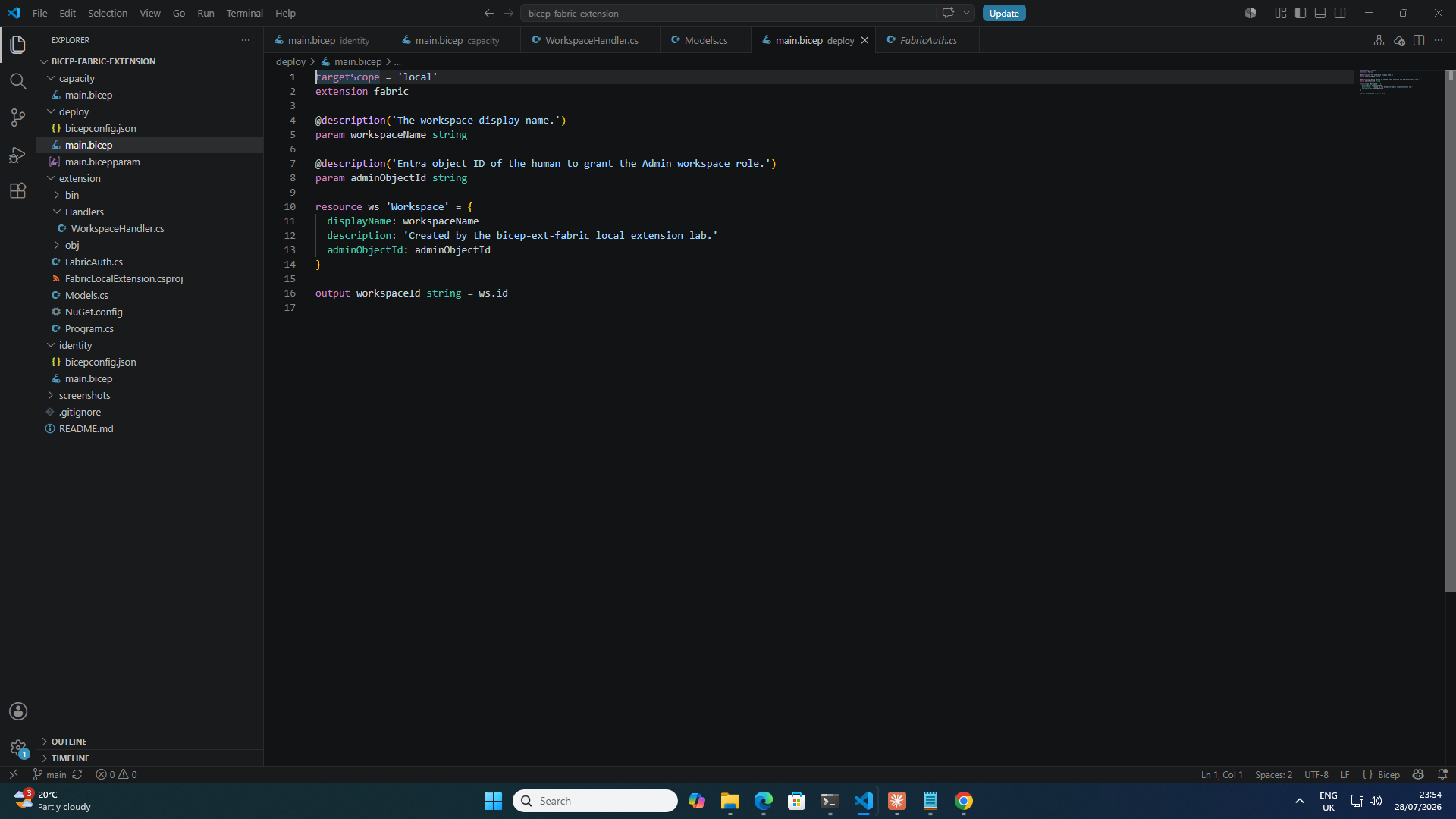
dotnet publish and bicep publish-extension produced a working binary on the first try. The real deploy didn’t:
RpcException: Response status code does not indicate success: 403 (Forbidden)
The full error, once I went looking with the service principal’s own token instead of trusting the CLI’s summary, was InsufficientPermissionsOverCapacity. Not a tenant-setting problem, a capacity-scoped one: assigning a workspace to a Fabric capacity at creation time requires the caller to hold Contributor (or Admin) on that specific capacity, and at the time I assumed capacity Admin (the administration.members ARM property) only accepted individual user accounts, not service principals. There’s a separate Contributor permission that does accept security groups, and it turns out to have no public REST API at all as of writing, it’s admin-portal-UI-only, under the capacity’s own Details → Contributor permissions setting.
Rather than hand the service principal Contributor rights through a portal click (which would have undermined the whole "keep this scripted" point), I split the two operations by identity instead: the extension creates the workspace with no capacity attached, then immediately grants a human admin (me) the workspace Admin role via POST /v1/workspaces/{id}/roleAssignments. A second, separate call, run with my own already-a-capacity-Admin credentials, does the actual assignToCapacity. Two identities, two different permission scopes, both satisfied without ever touching the one setting that has no API.
That assumption about administration.members turned out to be wrong, though. It does accept a service principal, by object ID, not app/client ID. The official Terraform AzureRM provider docs say so explicitly ("the member must be an Entra user or a service principal… if the member is a service principal, use object ID"), the assignToCapacity REST API’s own Entra-identity table lists service principals as supported, and a HashiCorp maintainer confirmed it empirically on a real capacity, seeing the SP show up in Fabric’s own Capacity administrators UI. I re-ran it myself to be sure rather than take docs on faith: created a fresh capacity with a service principal’s object ID in administration.members alongside my own, then called assignToCapacity with that SP’s own token. 202 Accepted, and capacityAssignmentProgress came back Completed. It just worked.
So the real story isn’t "service principals can’t be capacity admins", it’s that object ID and app/client ID are two different GUIDs for the same SP, and using the wrong one produces a permission-flavored error that looks exactly like a hard capability limit until you check. Easy mistake, and apparently a common enough one that it shows up in other people’s bug reports too. The Contributor permission is still portal-only, that’s a separate setting. The identity-splitting workaround above still isn’t a bad pattern even now it’s not strictly necessary, keeping what the SP itself can do to a minimum is a reasonable default regardless of what the API technically allows, but it’s no longer the only option.
╭──────────┬──────────┬───────────╮
│ Resource │ Duration │ Status    │
├──────────┼──────────┼───────────┤
│ ws       │ 1.6s     │ Succeeded │
╰──────────┴──────────┴───────────╯
╭─────────────┬──────────────────────────────────────╮
│ Output      │ Value                                │
├─────────────┼──────────────────────────────────────┤
│ workspaceId │ d6ad5747-6d5e-4bde-a185-a1e98cd62ba3 │
╰─────────────┴──────────────────────────────────────╯
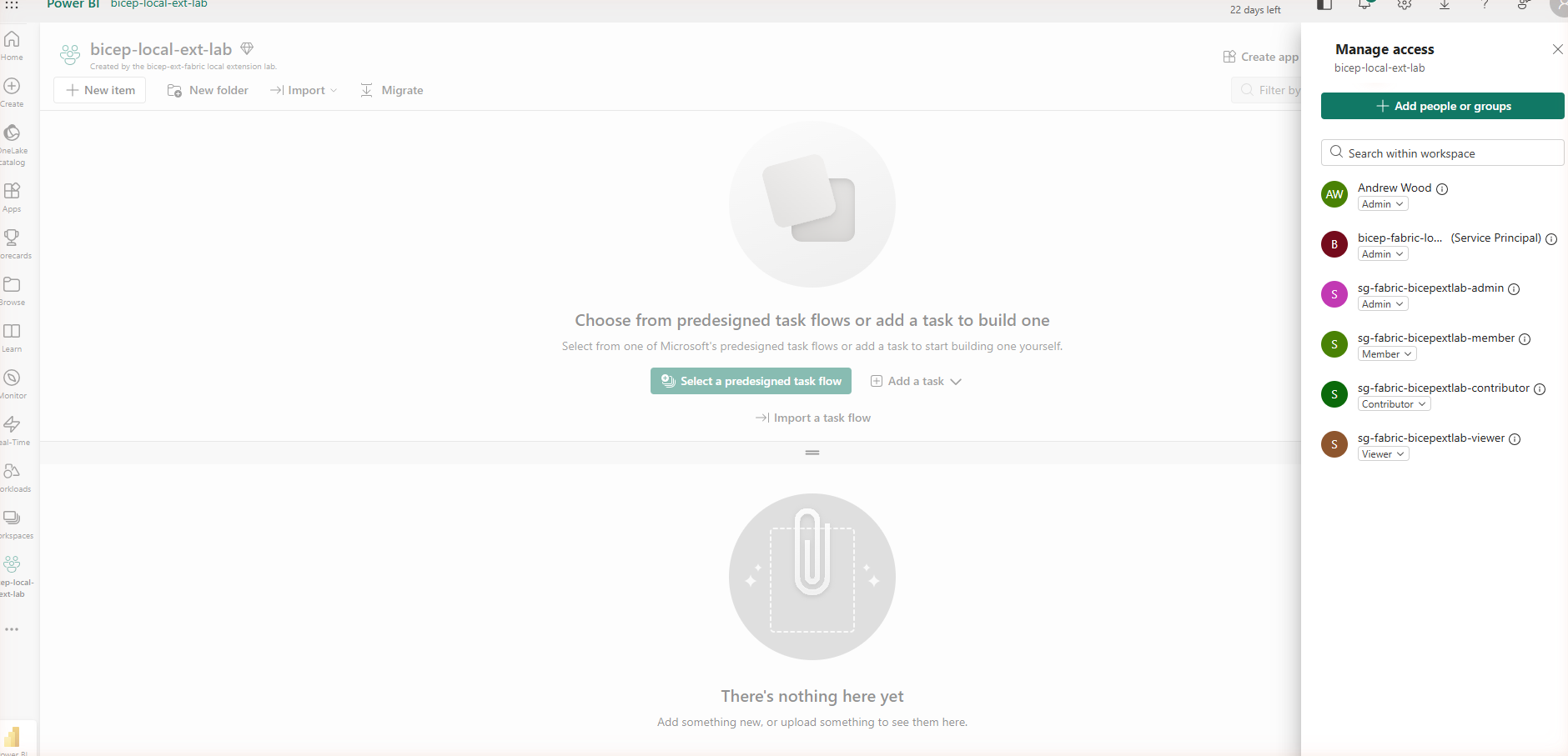
With that fixed, the whole chain worked: workspace created by the extension, assigned to the capacity by a human capacity admin, all four security groups wired into the workspace’s actual RBAC (Admin, Member, Contributor, Viewer), and the workspace’s own identity provisioned and added to a group like any other service principal.
The one thing I couldn’t demo
I wanted to show the delete path the same way, remove the resource from the .bicep file, redeploy, watch the extension’s Delete handler fire. It doesn’t work, at least not with bicep local-deploy as it stands today. The command is genuinely stateless between runs, there’s no local state file tracking what was deployed last time, so removing a resource and rerunning just produces an empty run with nothing to compare against:
╭──────────┬──────────┬────────╮
│ Resource │ Duration │ Status │
╰──────────┴──────────┴────────╯
Delete is a real, implemented part of the handler contract (it’s how the SDK’s abstract base class is shaped), but there’s currently no CLI-driven path that invokes it. I cleaned up the real workspace by calling DELETE /v1/workspaces/{id} directly instead. Worth knowing before you plan a demo around it: this is an experimental feature, and the gap between "the SDK supports it" and "the CLI can drive it" is still wide in places.
Cleanup
Everything in this lab was disposable by design: a resource group holding the F2 capacity and Key Vault, five Entra groups, one app registration, and two tenant settings I’d modified. All of it came down the same way it went up, script first: az group delete, az ad app delete, az ad group delete per group, and a couple of POST .../tenantsettings/{name}/update calls to clear the group references I’d added. One extra finding on the way out: the tenant setting I modified was already restricted to an existing security group, SG-FabricAutomation, that turned out to be a stale reference to a group that no longer exists in the tenant (a 404 from Graph on both /groups/{id} and /directoryObjects/{id}). That’s likely why my first attempt to update the setting failed with a generic 400 rather than succeeding, and it’s a good reminder that tenant settings can quietly accumulate dead references nobody notices until someone tries to change them.
Going multi: domains, several workspaces, and a tenant setting as a resource
One workspace was enough to prove the extension model works. It wasn’t enough to tell me whether it scales, and I happened to have a very concrete reference point sitting right next to it: a mature internal PowerShell and Bicep platform I use for production Fabric deployments, config-driven, multiple domains, multiple workspaces per domain, tenant settings management, the works. I used its feature list as a checklist for how far the single-workspace lab could reasonably go, then went and actually ran it, not just wrote the code and assumed.
Domains: the case where the API actually is SP-clean
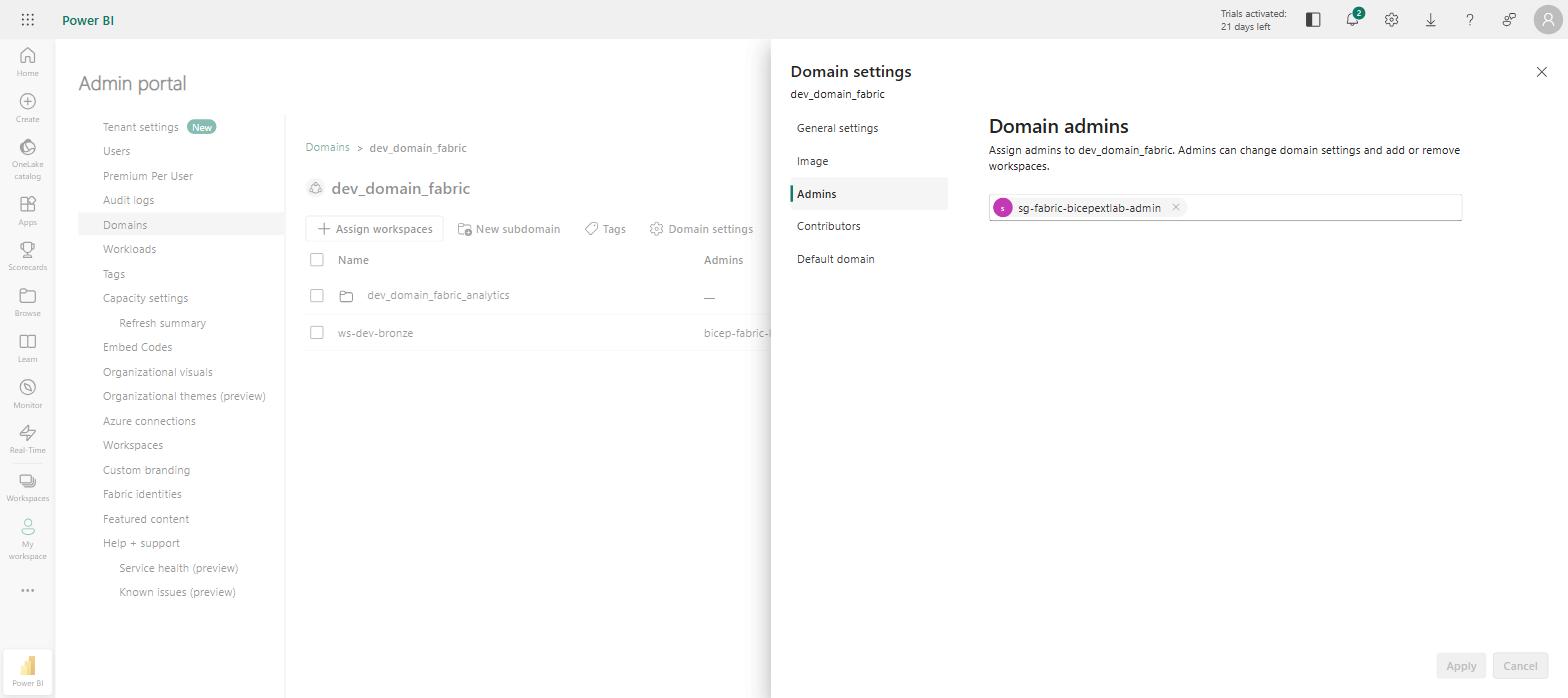
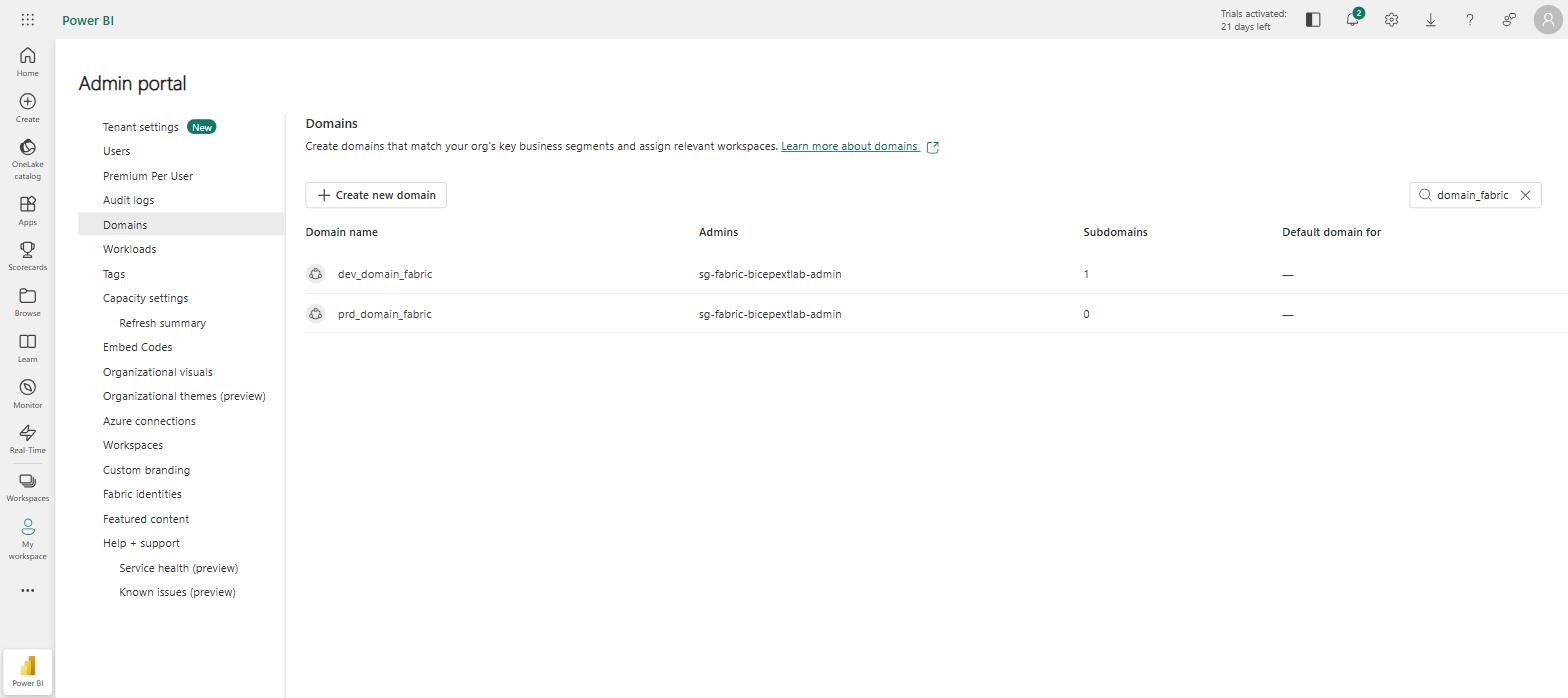
A Fabric domain turned out to be the same shape as a workspace almost exactly: POST /v1/admin/domains to create, DELETE /v1/admin/domains/{id} to remove, list-and-match-by-displayName since Delete only gets identifiers. Domains also support nesting via an optional parentDomainId, so the new Domain resource type picked that up too.
The interesting contrast with the capacity story earlier is role assignment. Assigning a Fabric capacity’s Contributor permission to a service principal has no public API at all, portal-UI-only, which is most of what made that story worth telling. Domain role assignment is the opposite case: POST /v1/admin/domains/{domainId}/roleAssignments/bulkAssign, with { type: "Admins" | "Contributors", principals: [...] }, and it genuinely accepts groups and service principals directly, no portal click required. Same platform, same "is this SP-friendly" question, two completely different answers depending on which corner of the admin surface you’re standing in.
One config, many domains and workspaces
deploy/main.bicep went from a single hardcoded workspaceName param to domains, childDomains, and workspaces arrays looped with for, each workspace resolving its domainName to the right domain’s Fabric-assigned ID automatically rather than a hand-copied GUID. That’s the Bicep-native version of the single JSON source-of-truth config the internal platform already uses, and it’s a genuinely nicer authoring experience: add an entry to an array instead of duplicating a whole resource block.
It also surfaced two Bicep language gotchas I hadn’t hit in the single-resource version:
A resource loop can’t reference its own collection, even via a computed index. My first attempt had nested domains resolving their parent’s ID from within the same domain loop (domain[indexOf(...)].id), which fails at compile time with BCP079: This expression is referencing its own declaration. Splitting top-level and nested domains into two separate resource loops, domain and childDomain, fixed it: referencing an already-declared resource collection from a different loop is fine, referencing your own is not.
A ternary over resource-array indices doesn’t behave the way the docs say if() should. Resolving a workspace’s domainId needs to pick between the domain collection and the childDomain collection depending on which one the name matches, so I wrote a ternary: contains(domainNames, w.domainName) ? domain[indexOf(...)].id : childDomain[indexOf(...)].id. That compiles fine and then fails at deploy time with domain[-1] is not valid, for a workspace whose domain is a nested one, where indexOf(domainNames, w.domainName) correctly returns -1 on the unchosen branch. Microsoft’s own docs on ARM’s if() are explicit that when the condition is decidable at the start of deployment, which mine was, only the selected branch gets evaluated, so this genuinely surprised me and I don’t have a confirmed explanation for the mechanism. My best guess, unconfirmed, is that resource-array-index references inside a copy loop get checked structurally while ARM builds its dependency graph, separately from the short-circuited value evaluation the docs describe, but that’s a guess, not something I found written down anywhere. What I can say for certain is the fix: clamping both indices with max(indexOf(...), 0) keeps both branches structurally in-bounds regardless of which one is unused, and the ternary’s selection still returns the correct value.
A third one showed up once real data hit it rather than just the one bicepparam entry I’d tested by hand: ?? doesn’t save you from a genuinely missing key. domains is an untyped array param, and my first prd-domain entry simply omitted contributorGroupIds rather than setting it to null. d.contributorGroupIds ?? [] still threw the language expression property 'contributorGroupIds' doesn't exist, because plain dot access on a key that isn’t there at all fails before ?? gets a chance to catch it. The safe-dereference operator, d.?contributorGroupIds ?? [], is what actually turns "key absent" into "value is null" so the fallback works. Small thing, but it only shows up once you feed it a config with genuinely varying shapes rather than a single hand-tuned example.
╭────────────────────────┬──────────┬───────────╮
│ Resource                │ Duration │ Status    │
├────────────────────────┼──────────┼───────────┤
│ domain[1]               │ 1.1s     │ Succeeded │
│ adminApiAccessSetting   │ 1.2s     │ Succeeded │
│ domain[0]               │ 1.2s     │ Succeeded │
│ childDomain[0]          │ 0.2s     │ Succeeded │
│ ws[2]                   │ 1.3s     │ Succeeded │
│ ws[1]                   │ 1.3s     │ Succeeded │
│ ws[0]                   │ 1.3s     │ Succeeded │
╰────────────────────────┴──────────┴───────────╯
╭────────────────┬──────────────────────────╮
│ Output          │ Value                    │
├────────────────┼──────────────────────────┤
│ childDomainIds  │ [ "<redacted>" ]         │
│ domainIds       │ [ "<redacted>",          │
│                 │   "<redacted>" ]         │
│ workspaceIds    │ [ "<redacted>",          │
│                 │   "<redacted>",          │
│                 │   "<redacted>" ]         │
╰────────────────┴──────────────────────────╯
Two domains, one nested child domain, three workspaces, and the tenant setting, all in one bicep local-deploy run.
The Graph extension hits a wall
None of that was the extension’s own new resource types. Redeploying the existing, untouched identity/main.bicep from earlier, groups, app registration, service principal, Key Vault, failed outright:
InvalidDeployment: The language expression property 'appId' doesn't exist,
available properties are 'uniqueName, displayName, owners'.
That’s the Microsoft Graph Bicep extension’s own Microsoft.Graph/applications resource, referencing its own appId to create the service principal, exactly as it did successfully in the original lab a day earlier. It compiled cleanly (Bicep’s type information says appId is a valid property), and it failed at ARM’s deploy-time evaluator regardless, even when I moved the app registration into its own deployment and tried reading appId back out as a plain output rather than a cross-resource reference. That rules out a same-deployment forward-reference problem specifically, the ARM-side extensibility handler for this resource type currently doesn’t expose appId or id at all, only the three properties you’d set going in. That’s an external regression in a hosted, evolving extension, not something fixable from the template side.
The pragmatic fix was to stop fighting it: create the app registration and service principal with plain az ad app create / az ad sp create, and pass the resulting object IDs into identity/main.bicep as parameters instead of resources. Everything downstream, the four RBAC groups, the Key Vault, the role assignment, stayed exactly as declarative as before. Only the two resources that this specific extension bug affects moved outside Bicep, and only because there wasn’t a working alternative today.
It’s since been fixed upstream. Re-running both the minimal repro and the exact original fabricExtApp → fabricExtSp → group-membership chain from identity/main.bicep, unmodified, against the same Bicep CLI version and the same pinned extension version originally used, both now work cleanly, appId and id readable, no workaround needed. The story above stands as it happened, and the az-cli workaround is still what’s live in the repo today (re-plumbing identity/main.bicep back to pure Bicep is a bigger change than this warrants on its own), but if you’re starting this from scratch, try the plain Bicep version first. It might just work.
Tenant settings as a resource, and the group that blocked its own fix
The cleanup step earlier already called POST /v1/admin/tenantsettings/{name}/update by hand to clear a group scope on the way out. That’s a real, service-principal-supported REST API (GET /v1/admin/tenantsettings to list, the update endpoint above to set), so it became the fourth resource type, TenantSetting, alongside Workspace and Domain.
Worth flagging plainly rather than glossing over: TenantSetting‘s Delete handler doesn’t delete anything, tenant settings have no delete concept, it disables the named setting tenant-wide and clears its group scope entirely. Fine here, since this lab only ever points it at a setting the lab itself owns. It would be a genuinely bad idea to reuse this exact resource against a setting something else in a real tenant actually depends on, removing the Bicep resource would silently disable it for everyone, not just roll back this lab’s change. Copy the pattern, not the assumption that Delete is always safe.
Same spirit applies to all three handlers, not just this one: names and IDs from the Bicep template go straight into the REST URLs with no validation or encoding. A non-issue here, since whoever controls the .bicepparam already has deploy access, but not a pattern to carry into anything that takes input from somewhere less trusted.
There’s a genuine bootstrap problem here that’s worth being honest about: the new Domain and TenantSetting handlers both call /v1/admin/... endpoints, which are gated by their own tenant settings, AllowServicePrincipalsUseReadAdminAPIs and AllowServicePrincipalsUseWriteAdminAPIs. A service principal can’t grant itself access to the API it needs permission to call in the first place, so that had to be fixed once, by hand, with a delegated (human) token, before the extension’s own TenantSetting resource could take over managing it declaratively from then on. Manual bootstrap once, GitOps after, which is a completely normal pattern for infrastructure that manages its own permissions, just worth naming rather than pretending the whole thing is turtles-all-the-way-down declarative.
Checking those two settings before touching anything turned up something directly relevant: both were already scoped to SG-FabricAutomation, the exact same stale, no-longer-existent group the cleanup step earlier flagged as a dead reference. Which meant, in practice, no service principal in the tenant could currently call any Fabric admin API at all, since the one group permitted to was orphaned. Adding my own working group to that list should have been purely additive. It wasn’t: the update endpoint validates every listed group against Entra before accepting the request, so keeping the dead SG-FabricAutomation entry alongside a real one produced a flat 400 Bad Request, and only dropping the dead reference entirely let the update through. That’s a stronger version of the same finding from the first post: a stale group reference in a Fabric tenant setting doesn’t just sit there harmlessly, it actively blocks you from fixing the setting at all until you remove it.
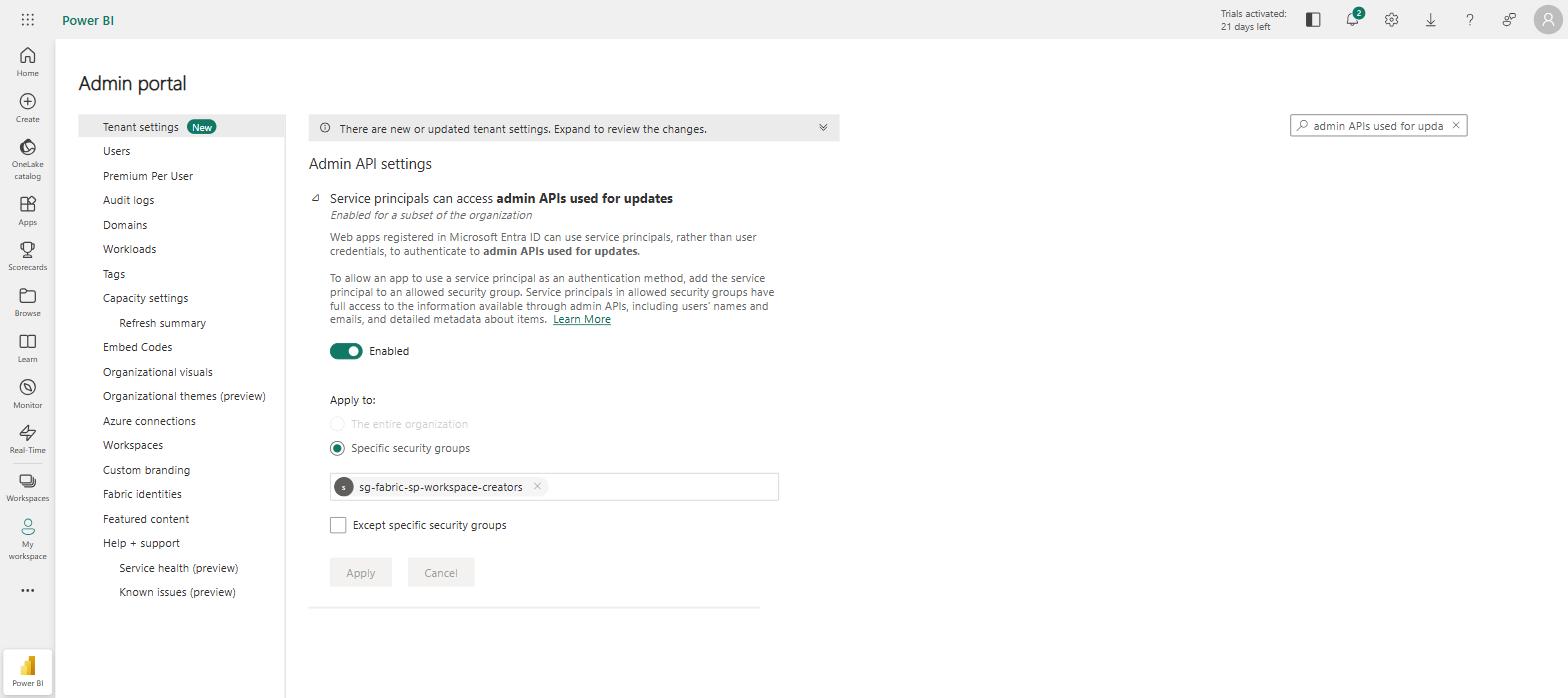
Showing the dead SG-FabricAutomation reference gone and the working group in its place.
What still doesn’t work, on purpose
Two things stayed ruled out, both already established rather than newly discovered:
- Workspace managed identity into Key Vault RBAC. Key Vault still isn’t a documented
provisionIdentitytarget (ADLS Gen2, SQL Server, Blobs, and Azure Analysis Services only), and Microsoft’s own guidance still points at a separate service principal for Key Vault access. Nothing about domains or tenant settings changes that. - Deployment stacks.
bicep local-deployis still stateless, no state file, no drift tracking, for the same reason the delete demo earlier didn’t work. Retrying a failed deployment in this round created a duplicatedev_domain_fabricdomain the first time and a409 Conflictagainst an already-createdprd_domain_fabricdomain the second, which is really the same statelessness problem wearing a different hat: not just "delete doesn’t fire," but "create isn’t idempotent either." Domains, at least, do enforce a display-name conflict rather than silently duplicating, which is more than I’d assumed going in.
I also left provisionIdentity and workspace Git integration out of this round rather than guess at their exact behaviour. provisionIdentity is a genuine long-running operation (a 202 with an operation ID to poll), and there was no consumer for the resulting identity once Key Vault was off the table, so adding polling machinery for a value nothing would use felt like exactly the kind of premature scope this lab is meant to avoid.
One operational gotcha, not a Bicep or Fabric one: resetting the extension’s client secret and immediately deploying produced intermittent 401 Unauthorized on some resources while others in the same run succeeded, most likely AAD credential propagation lag right after a fresh secret. Waiting under a minute before deploying made it disappear completely. Not exotic, but worth knowing if a from-scratch run of this lab looks flaky on the first attempt.
That secret-reset dance is also exactly the friction that made me add a second auth path. FabricAuth.cs now falls back to AzureCliCredential (from Azure.Identity) whenever FABRIC_CLIENT_ID/SECRET/TENANT_ID aren’t set, reusing whatever’s already logged in via az login, no SP or secret needed at all for local iteration. It’s not a substitute for testing the actual least-privilege SP story this whole post is about, and it’s a genuinely quieter failure mode than I’d like: if you typo an env var name, it doesn’t error, it just silently authenticates as whatever identity happens to be logged into the CLI instead, which could be a surprise on a shared machine. Worth knowing before you lean on it. Running it end to end this way also surfaced a real bug rather than a hypothetical one: with the caller and the workspace’s AdminObjectId set to the same principal (the natural setup when you’re running as yourself and granting yourself admin), the explicit role-assignment call 409s because you’re already Admin from creating the workspace, and the handler was treating that as a hard failure, aborting before the domain-assignment step ever ran. Fixed now: a 409 there means the desired state already holds, so it’s treated as success.
Would this run in Azure DevOps?
The internal automation platform this was measured against already runs entirely from Azure DevOps pipelines, service principal via workload identity federation, PR validation, the lot. It’s a fair question whether bicep local-deploy could slot into the same kind of pipeline, and the honest answer is: not natively, but not badly either.
There’s no Microsoft-provided pipeline task for local extensions the way AzureResourceManagerTemplateDeployment@3 exists for ordinary ARM deployments. local-deploy is a plain Bicep CLI subcommand, so running it in Azure DevOps means a plain script step, pwsh or bash, that installs the Bicep CLI, restores or rebuilds the extension binary, and runs bicep local-deploy directly. The meaningful difference from a normal Bicep pipeline is where the extension code actually executes: a local extension is a real process the CLI spawns and talks to over the Bicep Extensibility Protocol, so whatever machine runs bicep local-deploy, your laptop in this lab, a hosted or self-hosted DevOps agent in a pipeline, is the machine the extension’s own .NET code runs on. That’s a meaningfully different trust boundary from a normal ARM deployment, where the actual resource operations happen inside Azure’s own control plane regardless of which machine submitted the template. Worth being deliberate about, not a reason to avoid it: a self-hosted agent or a Microsoft-hosted one with no other secrets on it is a reasonable place to run untrusted-ish extension code; a shared, long-lived agent holding other pipelines’ credentials is a worse one.
Practically, that means:
- Build the extension in the pipeline, or as a versioned artifact from a prior stage, rather than committing a 45MB self-contained single-file binary to source control.
dotnet publish --configuration release -r win-x64 .(orlinux-x64, depending on the agent OS) followed bybicep publish-extensionare just pipeline steps, the same two commands from this lab’s README, not anything special to CI. - Auth via a service connection’s federated credential, exchanged for the
FABRIC_TENANT_ID/FABRIC_CLIENT_ID/FABRIC_CLIENT_SECRET(or better, a short-lived token) environment variablesFabricAuth.csalready expects, the same workload-identity pattern the reference platform already sets up for its own Azure Resource Manager service connection, just aimed at the Fabric API’s scope instead. - The agent needs the same
bicepconfig.jsonopt-in as locally,"experimentalFeaturesEnabled": {"localDeploy": true}, there’s no CLI flag for this, it’s config-file only, so it has to ship as a checked-in file in the repo rather than something a pipeline step sets. Still an experimental feature with no stability guarantee across CLI versions either way, worth pinning the CLI version explicitly in the pipeline rather than trusting whatever a hosted image happens to ship.
None of that is a worse fit than what the reference platform already does, its own PowerShell scripts are just as much "a script step that happens to call REST APIs" as bicep local-deploy is. The real difference is maturity: AzureResourceManagerTemplateDeployment@3 has years of hardening behind it, and bicep local-deploy from a pipeline agent is still exactly as experimental as it is from a laptop, arguably more so, since a CI failure here is opaque without the interactive terminal output this lab leaned on throughout.
Why This Matters
Terraform didn’t get Fabric coverage for free either, it needed a second, purpose-built provider because Fabric simply isn’t ARM-shaped. Bicep’s local extension model means that same gap doesn’t have to wait for Microsoft to build first-party support: anything with a REST API is now fair game to model as a Bicep resource, running locally, without ARM in the loop at all. That’s a bigger deal than one Fabric workspace. It’s a template for closing this exact kind of gap for any Azure-adjacent service that never quite lands in ARM.
What surprised me more than the extension itself was how much of the actual effort sat one layer up, in getting a service principal to legitimately do the thing at all: which tenant settings gate it, which permissions live on the capacity versus the workspace versus the tenant, and which of those have an API at all versus portal-only. None of that is Bicep’s fault, and none of it is really Fabric’s fault either, it’s just what "least privilege, done properly" costs in a platform with this many moving permission surfaces. The extension took an evening. Getting the identity model right took the rest of the weekend.