
Every post about deployment stacks tells you the same thing: deny settings mean not even an Owner can delete your resources. That’s true right up until someone moves one.
Every ARM/Bicep deployment mode has been Incremental for as long as I can remember using either. Complete mode exists, at resource group scope only (subscription-level deployments don’t support it at all), and does exactly what it sounds like: whatever’s in that resource group but not in your template gets deleted. In principle that’s the dream, your template becomes the actual source of truth rather than an approximation of it. In practice I’ve never once used it outside a throwaway sandbox, because the blast radius is the entire resource group. Anything anyone ever added by hand, any resource from a different pipeline that happens to share the group, all of it is fair game the moment Complete mode runs. Microsoft’s own docs have caught up with that verdict: the deployment modes page now carries a straight warning that Complete mode "is not recommended," pointing at deployment stacks as the replacement for anyone who actually needs deletes.
So the real-world compromise has usually been: stick to Incremental, and lean on governance rather than the deployment mode to keep drift in check. That’s a fairer description than "nothing enforces it." A properly built landing zone restricts write access to production resource groups down to the pipeline’s own identity, with PIM for anything that genuinely has to happen out of band. Azure Policy adds guardrails on top of that: required tags, allowed resource types and locations, drift audits on VM configuration via Automanage Machine Configuration. Microsoft’s own Cloud Adoption Framework guidance is to gate every merge on a what-if or plan diff before it lands, and to treat the next IaC run as the drift check itself, so anything that changed out of band shows up as a diff rather than something someone has to spot by eye in the portal.
What none of that answers is the actual question a template needs answered: is this resource mine. Policy tells you a resource is well-formed. RBAC tells you who was allowed to create it. A resource created through the same pipeline identity, with all the right tags, by a completely different template, sails through every one of those checks and still isn’t something your template knows to reconcile against. That’s a narrower gap than "nothing enforces it," but it’s the same gap, just fenced in by everything a strong landing zone does around it rather than left wide open. (Landing zone governance is a big enough topic to deserve its own post, and building a proper one is on the list. This one takes Incremental as the baseline and looks at what stacks add on top of it.)
Deployment stacks fix that, and the fix is genuinely good. But the security story around them has been flattened in the retelling, and there’s a hole in it that landed in the docs six weeks ago that I haven’t seen anyone write about.
A note on what this post is and isn’t. If you want the mechanics, go and read Dan Rios’ Azure Deployment Stacks: Zero to Hero. It’s the best end-to-end walkthrough out there: what stacks are, how they replace Blueprints, the three unmanage modes, stack outputs, and wiring them into GitHub Actions and Azure DevOps. He also has a nice follow-up on the "micro deployment pattern", splitting a monolithic template into layered stacks. This post assumes you’ve got that part and goes at one specific question instead: what do deny settings actually protect, and where does that protection stop? Dan’s post is how stacks work. This one is where the security claim leaks.
What a deployment stack actually tracks
A deployment stack is its own resource (Microsoft.Resources/deploymentStacks), created at resource group, subscription, or management group scope, that keeps a managed list of exactly which resources your template put there, by ID, regardless of what else shares the scope. It’s been generally available since May 2024. You need Azure CLI 2.61.0 or later, or Az PowerShell 12.0.0 if that’s your poison:
az stack group create \
  --name 'demoStack' \
  --resource-group 'demoRg' \
  --template-file './main.bicep' \
  --action-on-unmanage 'detachAll' \
  --deny-settings-mode 'denyDelete'
Update the Bicep file and rerun the same command to update the stack. Remove a resource from the template and the stack notices it’s no longer managed, then does whatever --action-on-unmanage says: detachAll leaves it alone, deleteResources removes just the orphaned resources, deleteAll takes the resource groups with it too. That’s Complete mode’s promise, minus having to nuke the whole resource group to get it: the stack only ever touches what it actually deployed.
Deny settings, and the sentence everyone repeats
This is the part Complete mode never had an answer for. --deny-settings-mode denyDelete (or denyWriteAndDelete, which blocks modification too) creates an actual deny assignment against every resource the stack manages. Deny assignments sit outside normal RBAC evaluation and block an action even if a role assignment grants it, so someone with Owner on the resource group can’t delete a stack-managed resource directly unless they’re specifically excluded:
az stack group create \
  --name 'demoStack' \
  --resource-group 'demoRg' \
  --template-file './main.bicep' \
  --action-on-unmanage 'detachAll' \
  --deny-settings-mode 'denyDelete' \
  --deny-settings-excluded-actions 'Microsoft.Compute/virtualMachines/write' \
  --deny-settings-excluded-principals '<object-id>'
Up to 200 excluded actions and 5 excluded principals. One trap worth knowing, and it’s documented rather than folklore: passing more than five principals doesn’t return an error, so nothing tells you the sixth onwards aren’t what you think they are. Microsoft’s own guidance is to consolidate into an Entra group instead, which counts as one principal and lets you change who’s exempt by editing group membership rather than redeploying the stack. There’s also --deny-settings-apply-to-child-scopes, which extends the deny setting to child resources of what the stack manages (databases under a SQL server, say), not just the resources named in the template.
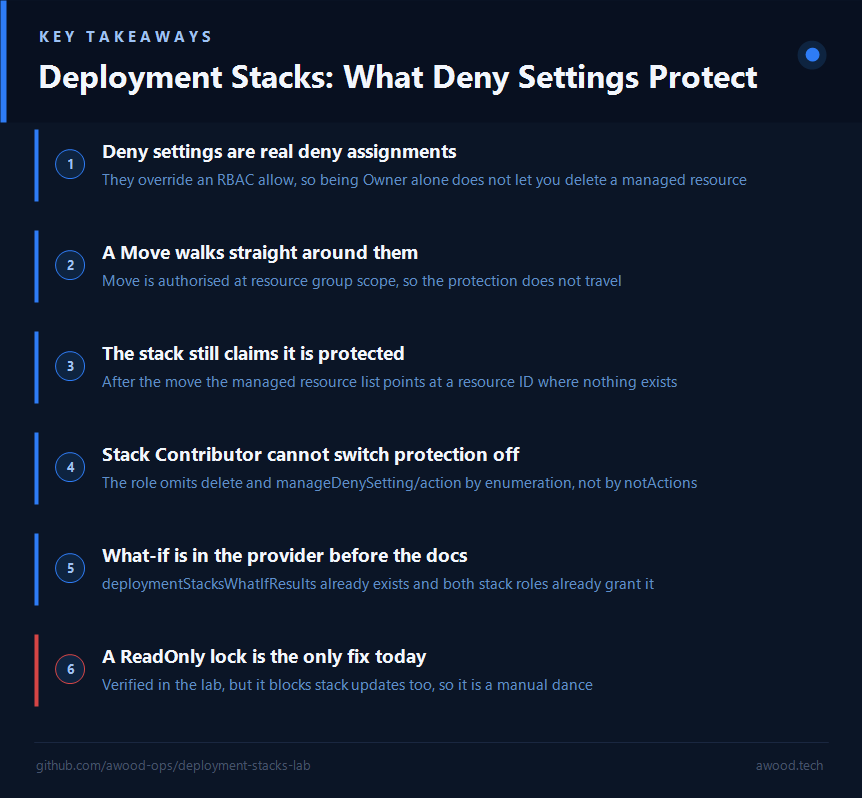
"Even an Owner can’t delete it" is the line that sells deployment stacks, and it’s the line nearly every write-up leads with. It’s also doing a lot of load-bearing work for a claim with four documented exceptions.
Four ways around a deny setting
Before anyone puts "not even Owner can touch it" on a slide, these are all straight from Microsoft’s own docs.
1. Delete the resource group. A resource-group-scoped stack doesn’t manage its parent resource group, because the group isn’t in the Bicep file. So denyDelete on every resource inside it won’t stop someone deleting the group itself, taking the stack and everything it managed along for the ride. Documented known issue, not a corner case.
2. Move the resource out. This is the new one, and it’s the reason I rewrote this post. Deny assignments are evaluated at resource group scope for Move operations, not at the individual resource scope. So a resource can be moved out of its resource group even though a deny assignment is protecting that specific resource, and the protection does not travel with it. The resource lands in its new home unprotected and manageable by anyone with rights there. The stack, meanwhile, still lists it as managed.
That last part is what makes it worse than it first sounds. It isn’t just that protection is lost; it’s that the stack’s view of the world is now wrong, and the thing you’d rely on to tell you (the stack’s managed resource list) is exactly what’s been fooled. Microsoft’s interim mitigation is a read-only lock on the resource group to block Move operations outright. Stack reads and deny-delete protection keep working with the lock in place, but you have to remove it for the duration of any stack update and put it back afterwards, which is precisely the kind of manual dance that eventually gets skipped.
On dating this one, since I’d want to check it myself if I were reading this: the text went public in the commit that created the deployment stacks known-issues page on 23 June 2026, when known issues were split out of the main stacks article. The page’s own date stamp reads 11 June 2026, so don’t be thrown if the footer and the commit history disagree.
3. Write to the stack itself. The deny settings live on the stack, and the stack is just a resource. Anyone who can write to it can weaken or remove its deny settings, then delete whatever they like. Azure ships two built-in roles to split that, and the split is worth looking at properly rather than taking the role names at face value:
az role definition list --name "Azure Deployment Stack Contributor" \
  --query "[].permissions[0].actions" -o json
[
  "Microsoft.Authorization/*/read",
  "Microsoft.Insights/alertRules/*",
  "Microsoft.Resources/deployments/*",
  "Microsoft.Resources/subscriptions/resourceGroups/read",
  "Microsoft.Resources/deploymentStacks/write",
  "Microsoft.Resources/deploymentStacks/read",
  "Microsoft.Resources/deploymentStacks/validate/action",
  "Microsoft.Resources/deploymentStacks/exportTemplate/action",
  "Microsoft.Resources/deploymentStacksWhatIfResults/*"
]
Azure Deployment Stack Owner, by contrast, collapses everything deploymentStacks-specific into one Microsoft.Resources/deploymentStacks/* wildcard, layered on the same supporting actions as Contributor (the Authorization reads, alert rules, deployments, and so on). So the split isn’t done with notActions, it’s done by enumeration: Contributor gets read, write, validate and exportTemplate spelled out individually, and the two operations it never receives are delete and manageDenySetting/action. That’s the one that matters. A Deployment Stack Contributor can update the stack all day and cannot switch its protection off.
Worth knowing that enforcement of that underlying permission, Microsoft.Resources/deploymentStacks/manageDenySetting/action, is currently rolling out region by region, Government Clouds included, per a warning on the docs page. So the answer to "can this principal change our deny settings?" may depend on which region you’re asking in this month, which is not a sentence anyone wants in a control description.
4. Go around the control plane entirely. Deny settings only cover control-plane operations on explicitly created resources. Data-plane children (secrets in a Key Vault, blobs in a container) and implicitly created resources (the VMs an AKS cluster spins up for itself) aren’t protected, because the stack never created them as far as ARM is concerned.
The scope pattern that closes most of it
The fix for the first and third of those is the same pattern, and Learn spells it out: create the stack at subscription scope and have the template deploy into resource group scope, with the resource group itself defined in the Bicep file. Developer teams get visibility and write access to the resource group; the stack, and its deny assignment, live a level up where resource-group contributors and owners can’t reach them. Microsoft’s wording is that this "minimizes the number of users that can edit a deployment stack and make changes to its deny-assignment", which is exactly the point.
That’s a genuinely good pattern and it’s what I’d build on. One boundary to know before you push it further up the tree: deny assignments aren’t supported at management group scope at all. They work fine in a management-group-scoped stack whose deployment targets a subscription, but you can’t protect management-group-level resources this way. The ladder stops there.
The Move gap survives all of this, incidentally. Subscription-scope separation doesn’t help, because the resource is still being moved out of a resource group whose scope is where the deny assignment gets evaluated.
Other sharp edges worth knowing upfront
No what-if. The what-if operation still isn’t supported for deployment stacks at the time of writing. For a tool whose whole pitch is "this will delete things you removed from the template," not being able to preview the blast radius is the limitation I’d most like closed.
It does look like that’s actively in flight, though, and you can see it from the outside without waiting for an announcement. Ask the resource provider what operations it exposes:
az provider operation show --namespace Microsoft.Resources \
  --query "resourceTypes[?contains(name,'deploymentStack')].{type:name, ops:operations[].name}" -o json
[
  {
    "ops": [
      "Microsoft.Resources/deploymentStacks/read",
      "Microsoft.Resources/deploymentStacks/write",
      "Microsoft.Resources/deploymentStacks/delete",
      "Microsoft.Resources/deploymentStacks/validate/action",
      "Microsoft.Resources/deploymentStacks/exportTemplate/action",
      "Microsoft.Resources/deploymentStacks/manageDenySetting/action"
    ],
    "type": "deploymentStacks"
  },
  {
    "ops": [
      "Microsoft.Resources/deploymentStacksWhatIfResults/read",
      "Microsoft.Resources/deploymentStacksWhatIfResults/write",
      "Microsoft.Resources/deploymentStacksWhatIfResults/delete",
      "Microsoft.Resources/deploymentStacksWhatIfResults/whatIf/action"
    ],
    "type": "deploymentStacksWhatIfResults"
  }
]
There’s a whole deploymentStacksWhatIfResults resource type with a whatIf/action on it, and both built-in stack roles already grant deploymentStacksWhatIfResults/*. The plumbing is in the provider and in the RBAC model before the feature is documented as available. That also tells you the manageDenySetting/action string above is real rather than something I inferred from a role description.
The stack-out-of-sync error. If the stack’s record of what it manages falls out of sync with reality, an update or delete throws rather than guessing:
The deployment stack 'myStack' might not have an accurate list of managed resources.
To prevent resources from being accidentally deleted, check that the managed resource
list doesn't have any additional values. If there is any uncertainty, it's recommended
to redeploy the stack with the same template and parameters as the current iteration.
To bypass this warning, specify the 'BypassStackOutOfSyncError' flag.
There’s a --bypass-stack-out-of-sync-error flag (BypassStackOutOfSyncError in PowerShell), and the docs are blunt about it: review the resource list first, and don’t use it by default. Sensible, if a little alarming the first time you hit it.
Ceilings. 800 stacks per scope, and 2,000 deny assignments. Both figures come off the known issues page. Worth a glance at the subscription limits page too, because it words the second one as 2,000 system-managed deny assignments per subscription rather than per scope. Fine for most estates either way, worth knowing if you’re planning a stack per application per environment across a big one.
Assorted. Stacks can’t delete Key Vault secrets, so remove those with detach mode. The Microsoft Graph provider doesn’t support stacks. And if you’re on Az PowerShell, the DeleteResourcesAndResourceGroups value for ActionOnUnmanage is being removed, so don’t build anything on it.
Trying it for real
Reading about a documented gap is one thing. I wanted to watch it happen, so I built a small lab: a resource-group-scoped stack managing a storage account and a VNet, with denyWriteAndDelete set, then a series of tests against it. The whole thing is on GitHub if you want to run it yourself. It cleans up after itself.
The template is deliberately boring, and it’s built on Azure Verified Modules rather than raw resource declarations, because the point of the lab is the stack’s behaviour and not my ability to hand-roll a storage account:
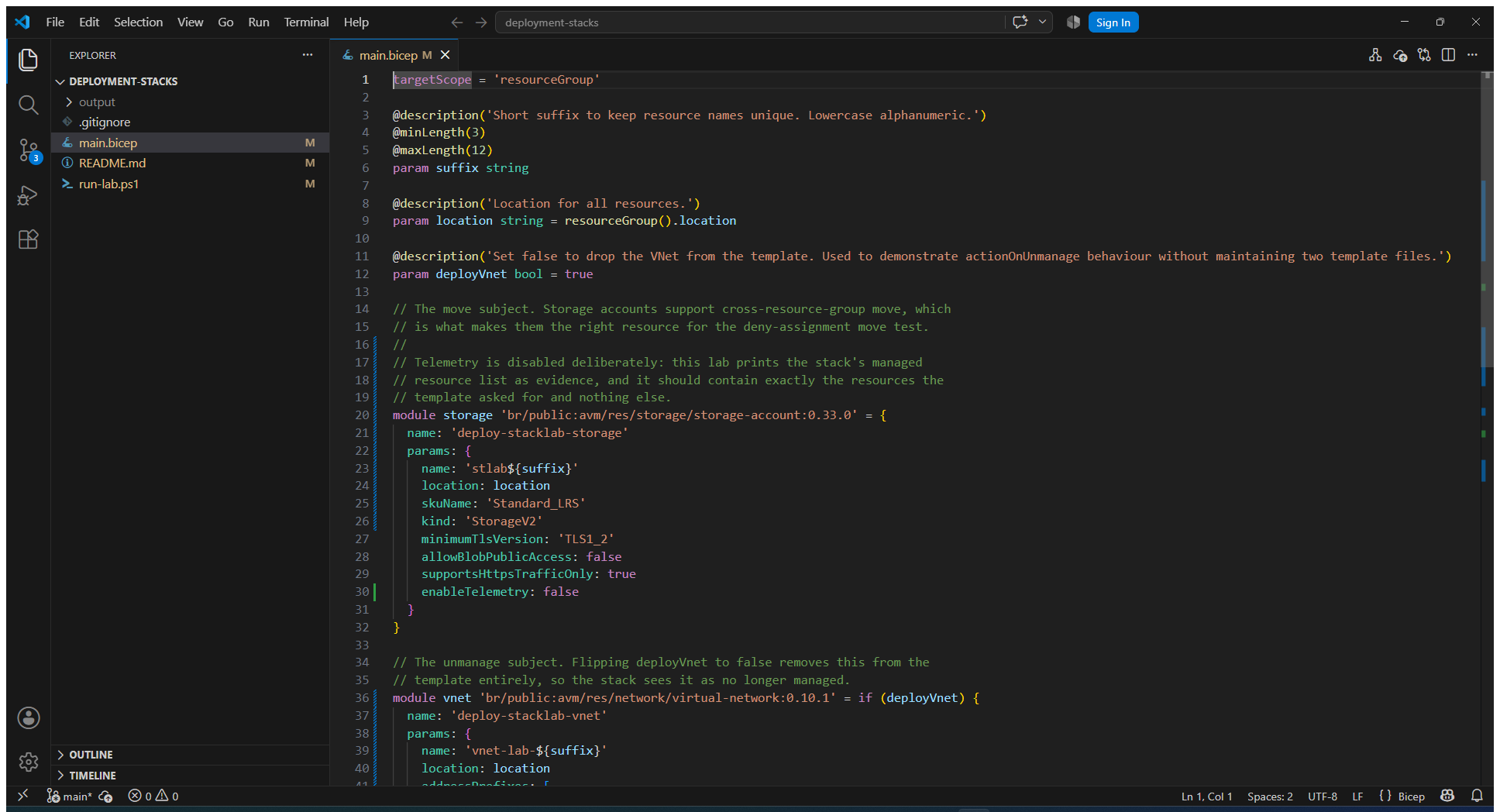
The deployVnet parameter is the only clever bit. Flipping it to false drops the VNet out of the template entirely, which is how the lab exercises actionOnUnmanage without maintaining two template files.
The harness itself runs eight tests across four throwaway resource groups, and two of them are supposed to succeed in the sense that a PASS means the documented gap reproduced rather than the protection held:
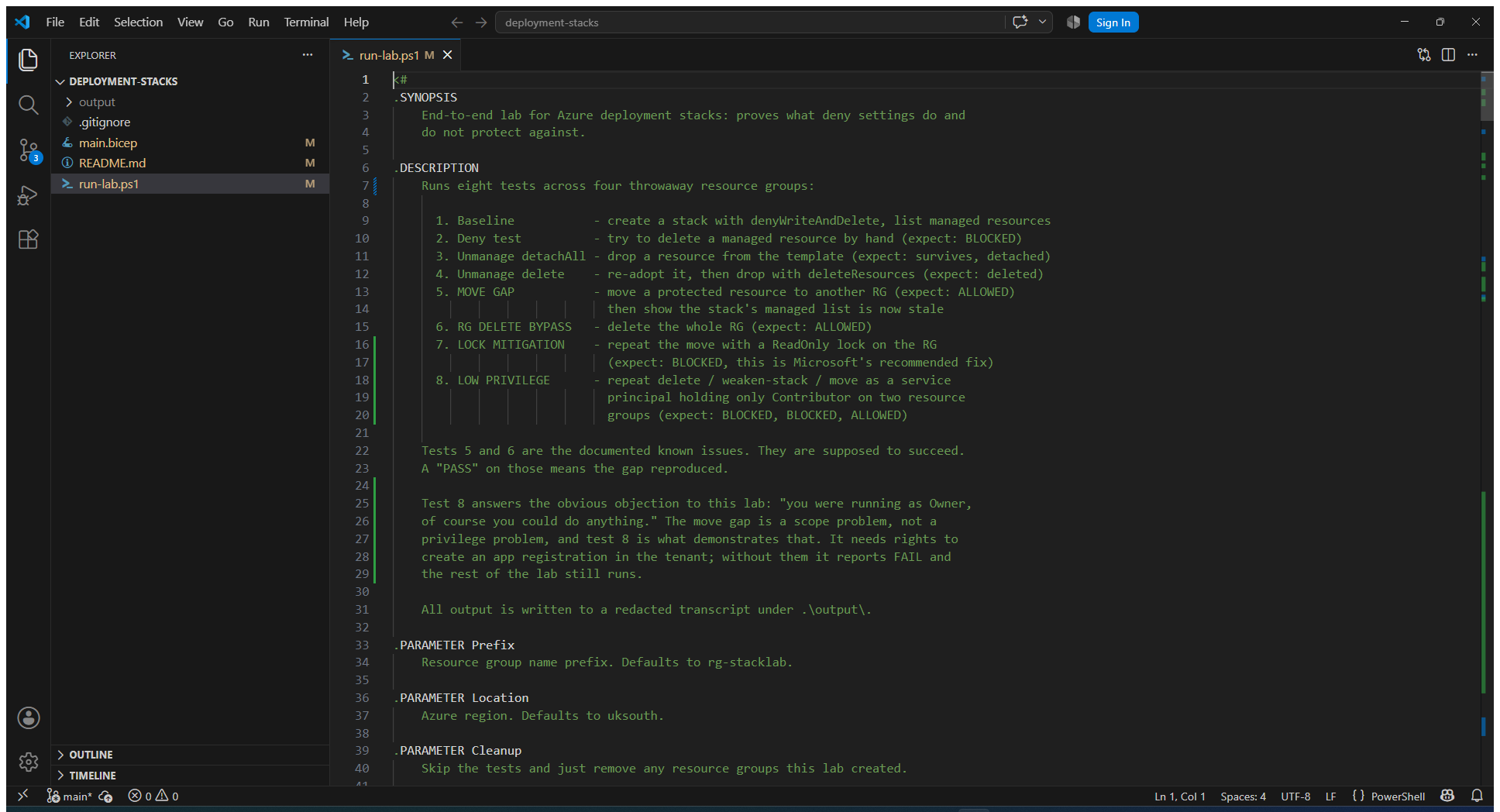
First, the good news. The stack does exactly what it says on the resources it manages:
[
  {
    "denyStatus": "denyWriteAndDelete",
    "id": "/subscriptions/<subscription-id>/resourceGroups/rg-stacklab-src/providers/Microsoft.Network/virtualNetworks/vnet-lab-gjdw78",
    "status": "managed"
  },
  {
    "denyStatus": "denyWriteAndDelete",
    "id": "/subscriptions/<subscription-id>/resourceGroups/rg-stacklab-src/providers/Microsoft.Storage/storageAccounts/stlabgjdw78",
    "status": "managed"
  }
]
Try to delete one of those by hand and Azure refuses, in the most quotable way possible:
DenyAssignmentAuthorizationFailed: The client '<account-email>' with object id
'<object-id>' has permission to perform action
'Microsoft.Network/virtualNetworks/delete' on scope '.../vnet-lab-gjdw78';
however, the access is denied because of the deny assignment with name
'Deny assignment '<guid>' created by Deployment Stack '.../stack-denylab''
Read that middle clause again: has permission to perform action … however, the access is denied. That’s a deny assignment doing precisely what it’s for, overruling an RBAC allow that would otherwise have gone through.
One aside for anyone automating a check like this. I originally wrote that test around az resource delete, which wraps refusals in a generic "Some resources failed to be deleted" message and swallows the reason. The delete was being blocked correctly and my assertion couldn’t see why. The lab uses az rest for that call now, which surfaces the real error. A wrapper that hides the cause is its own small trap.
The unmanage behaviour is equally well-mannered: flip the VNet out of the template with detachAll and the stack reports it in detachedResources and leaves the real thing alone. Put it back, then drop it again with deleteResources, and it moves to deletedResources and is genuinely gone, with nothing else in the group touched. That’s the part everyone writes about, and it works.
Then I moved the storage account to another resource group.
az resource move --destination-group 'rg-stacklab-dst' --ids '<storage-account-id>'
It went through. No error, no prompt, no deny assignment in the way. The account landed in the destination group and the source group was left empty. So far this is only what the docs warned me about. What I didn’t expect was this, which is the stack immediately afterwards:
[
  {
    "denyStatus": "denyWriteAndDelete",
    "id": "/subscriptions/<subscription-id>/resourceGroups/rg-stacklab-src/providers/Microsoft.Storage/storageAccounts/stlabgjdw78",
    "status": "managed"
  }
]
The stack still says status: managed and denyStatus: denyWriteAndDelete, against a resource ID in rg-stacklab-src where nothing exists any more. It isn’t reporting an error. It isn’t out of sync. It is telling me, confidently, that it is protecting something that left.
So I deleted the storage account in its new home, to see whether any protection had followed it:
az resource delete --ids '<moved-storage-account-id>'
Gone, first time. No deny assignment, no complaint. A resource that thirty seconds earlier was covered by denyWriteAndDelete was deleted by the same account that couldn’t touch it before the move, and the stack that was supposed to be guarding it never got a say.
It isn’t a permissions artefact
My first thought was that this was my own fault. I was running as Owner with User Access Administrator alongside it, which is not a realistic set of permissions and is exactly the sort of thing that invalidates a security test. So the lab now asks the resource what deny assignment is actually sitting on it:
az rest --method get \
  --url "https://management.azure.com<storage-account-id>/providers/Microsoft.Authorization/denyAssignments?api-version=2022-04-01"
{
  "permissions": [{ "actions": ["*"], "notActions": ["*/read"] }],
  "principals": [{ "id": "00000000-0000-0000-0000-000000000000", "type": "SystemDefined" }],
  "excludePrincipals": [],
  "isSystemProtected": true,
  "doNotApplyToChildScopes": true,
  "scope": ".../resourceGroups/rg-stacklab-src/providers/Microsoft.Storage/storageAccounts/stlab<suffix>"
}
That all-zeroes principal ID is the "all principals" wildcard, and excludePrincipals is empty. The deny assignment applied to everyone, me included, which is the entire point of deny assignments: they override RBAC allow, so being Owner buys you nothing. The proof is in the run itself. The same account, in the same session, was refused when it tried to delete that resource in place. If my permissions had exempted me, that delete would have gone through too.
Look at the last line instead. The deny assignment’s scope is the individual resource. Move operations are authorised at resource group scope, against Microsoft.Resources/subscriptions/resourceGroups/moveResources/action on the source and write on the destination. Deny assignments inherit downwards to child scopes, never upwards. So the assignment isn’t being overridden or outranked, it’s sitting at a scope the authorisation check for a Move never consults. No amount of reducing my permissions would change that, and no amount of increasing them was needed.
While you’re looking at that output, doNotApplyToChildScopes deserves a second of attention, because the polarity is the opposite of what the CLI flag name suggests. This run did not pass --deny-settings-apply-to-child-scopes, and the generated assignment reads doNotApplyToChildScopes: true. Pass the flag and it becomes false. The portal renders the same property as a "Does not apply to children" column. If you go reading your own deny assignments expecting the flag name to appear as-is, you’ll read them backwards.
For completeness the lab runs the other documented bypass too: with a resource-group-scoped stack, az group delete on the parent group succeeds and takes the stack, the deny assignment and every managed resource with it. That one at least fails loudly in the sense that everything visibly disappears. The move is quieter, and quiet is worse.
Does the recommended mitigation actually work?
Microsoft’s answer to the move gap is a ReadOnly lock on the resource group, and the docs are unambiguous that resources can’t be moved if one exists on the source, the destination, or the subscription. I’ve been caught out enough times by documentation that understates a problem (this article being a case in point) that I wanted to see it rather than trust it.
It works. Same stack, same deny settings, same move command, with a ReadOnly lock on the resource group:
az lock create --name 'stacklab-readonly' --lock-type 'ReadOnly' --resource-group 'rg-stacklab-lock'
az resource move --destination-group 'rg-stacklab-dst' --ids '<storage-account-id>'
ERROR: (ScopeLocked) The scope '/subscriptions/<subscription-id>/resourceGroups/rg-stacklab-lock'
cannot perform write operation because following scope(s) are locked:
'/subscriptions/<subscription-id>/resourceGroups/rg-stacklab-lock'.
Please remove the lock and try again.
The move is refused and the resource stays put. So the mitigation is real, and if you’re relying on deny settings for anything that matters, it’s not optional.
The cost is that a ReadOnly lock blocks stack updates too. Reading the stack and its deny-delete protection keep working, but to change anything you remove the lock, deploy, and put it back. That’s a manual dance around an automated pipeline, and manual dances get skipped. Until deny assignments are evaluated for Move operations, that’s the trade: an extra moving part in your deployment process, or a protection that a single az resource move walks around.
The test I couldn’t run
There’s one test in the lab that didn’t complete, and I’d rather say so than quietly drop it. Test 8 creates a throwaway service principal holding Contributor on two resource groups and nothing else (no Owner, no User Access Administrator, no stack roles) and repeats the delete, the weaken-the-stack attempt and the move as that principal. It’s there to kill the "you were Owner, of course it worked" objection empirically rather than by argument. On my run it failed at the first step, because the tenant I was in wouldn’t let me create the app registration, so the low-privilege path is unproven by execution.
I don’t think it changes the conclusion, because the reasoning above doesn’t depend on it: the deny assignment binds all principals with no exclusions, and the Move authorisation check happens at a scope that assignment doesn’t cover. Privilege isn’t the variable, scope is. But "I reasoned it through" and "I watched it happen" are different claims, and only one of them applies to that particular test. The code is in the repo if you have a tenant where you can create service principals and want to close the loop.
Why This Matters
Complete mode always had the right idea and the wrong risk profile: a single all-or-nothing lever over an entire resource group is a hard thing to trust with production. Deployment stacks get to the same destination, a template that’s genuinely authoritative over what it deployed, without needing to nuke everything else nearby to prove it. That part deserves the enthusiasm it gets.
The deny settings are the reason to adopt them, and also the reason to read the known issues page before you write them into a control description. There’s a real difference between "nobody can delete this" and "nobody can delete this, in place, through the control plane, while it stays in this resource group, assuming nobody can write to the stack." The first is what gets presented to an auditor. The second is what Azure actually enforces. Stacks are still the best drift control Azure has shipped, and I’d use them. I’d just write the caveats down first, because the gap between those two sentences is exactly where an incident lives.
Leave a Reply