How a device that was fully enrolled, compliant, and up to date still failed sign-in, and why the fix had nothing to do with the browser.
I got asked to help out on this one as a favour, which is always a slightly loaded phrase. I hadn’t opened Intune’s device configuration screens in a good few years, and I was never particularly deep into the nitty-gritty of Apple’s SSO extension framework even back when I used it more regularly. Normally that combination is a decent reason to hand a ticket straight back to whoever’s closer to it day to day. Instead it just made me stubborn about it. Once I’d read the symptom I was determined this thing wasn’t going to beat me, purely on principle.
If you enforce device-based Conditional Access in Microsoft Entra, you’ve probably hit this one anyway, rusty or not. A third-party iPhone app (in our case Pleo, though the same thing happened with Jira) fails sign-in with "You can’t get there from here." Dig into the sign-in logs and the real error is 530003: "Your device is required to be managed to access this resource." The device is enrolled, compliant, and the user swears blind they’ve done nothing wrong. Here’s what was actually going on, and the fix that worked, including the bit where I convinced myself I understood the problem and was completely wrong.
The misleading part
The error page tells users they need to use Microsoft Edge, so the obvious instinct is to make the app open Edge instead of Safari. That’s a dead end, and it cost us a fair bit of time before we understood why, not helped by the fact that "just make it use Edge" sounded exactly plausible enough to someone several years out of practice with Apple device management. It’s the kind of assumption that feels solid right up until you try to act on it and discover there’s no lever to pull.
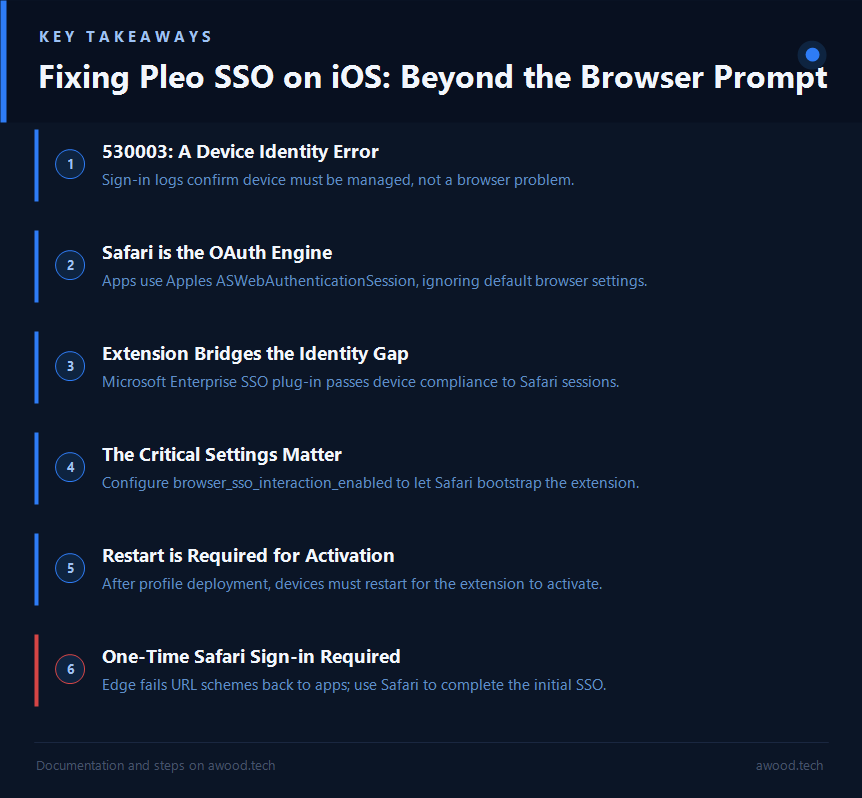
iOS apps doing OAuth sign-in use Apple’s ASWebAuthenticationSession: a system sign-in sheet built on Safari’s WebKit engine. It ignores the phone’s default browser setting entirely, and there’s no per-app toggle to change it. You cannot make a third-party app authenticate "through Edge." The prompt is telling you to use a browser you have no way of invoking.
The real problem was never which browser got used. It was that Safari-based sign-in sessions don’t present device identity to Entra by default. So a fully compliant, Intune-enrolled, corporate-owned device still fails the compliance check, because the session it’s signing in with has no way to prove any of that.
What the sign-in logs actually said
The Entra sign-in logs told the real story: application was the third-party app, client app was "Browser", user agent was Safari, and the failure was 530003 (device must be managed). We checked the device itself in Intune first and it was fine: enrolled, corporate, compliant, recent check-in. So the gap wasn’t the device. It was purely in how (or whether) that compliance got conveyed during sign-in.
Next stop was the device’s configuration profiles in Intune, and that’s where we found the missing piece: no Single sign-on app extension profile had ever been deployed. That extension, the Microsoft Enterprise SSO plug-in for Apple devices, is exactly what bridges device identity into Safari and other non-MSAL app sign-ins. Atlassian’s own knowledge base points at the same fix for their apps, which was a useful confirmation we weren’t chasing something Pleo-specific.
The fix: deploy the Enterprise SSO plug-in via Intune
Create a device configuration profile: Devices > iOS/iPadOS > Configuration profiles > Templates > Device features > Single sign-on app extension, with:
SSO app extension type:  Microsoft Entra ID
App bundle IDs:          com.pleo               (Pleo)
                          com.atlassian.jira.app  (Jira)

Additional configuration:
  browser_sso_interaction_enabled  (Integer) = 1
  disable_explicit_app_prompt      (Integer) = 1
browser_sso_interaction_enabled is the setting that actually lets Safari-based sign-ins bootstrap the extension. Without it, the profile deploys and does nothing.
Two gotchas we hit along the way, both of which felt obvious in hindsight and neither of which I got right first time:
- The App bundle IDs field is for the target apps, not the extension itself. I spent a confused ten minutes trying to enter the SSO extension’s own identifier there before realising the field wants the apps you’re granting SSO to, not the plug-in doing the granting. The plug-in itself is delivered automatically via Microsoft Authenticator, which just needs to be installed and signed in on the device, nothing to configure by hand.
- The extension needs a device restart to activate, the first time the profile lands. Closing and reopening the app isn’t enough, and this is the step most likely to generate "it still doesn’t work" tickets. I lost a test cycle to this myself before restarting the phone out of sheer bloody-mindedness and watching it start working. Warn people up front and you’ll save yourself a round of follow-ups.
After assignment, sync, and a restart, Jira signed in first try. For a quick verification on any device: browse to myapps.microsoft.com in Safari. If that completes without 530003, the extension is working.
The Pleo-specific twist: Edge can’t finish the job
Once the extension was live, Pleo’s sign-in got past Conditional Access, but then stalled at its "Continue in Pleo mobile app" page. Tapping the button in Edge threw "Something went wrong. The application couldn’t be opened."
Turns out this is a known limitation of Edge on iOS: it doesn’t hand universal links or custom URL schemes back to native apps, it just reloads them as web pages. Other people have hit the exact same wall: a report on Microsoft’s own Intune App SDK tracker describes universal links failing to reopen the app right after SSO sign-in through Edge, so at least we weren’t imagining it. We tried App Protection Policy exemptions for Pleo’s URL scheme and universal link domains, expecting that to unblock the handoff. No effect, because the problem was Edge’s link handling, not the policy.
The answer was to stop fighting it. Our original assumption, that Safari wouldn’t pass Conditional Access, was no longer true once the SSO extension was deployed. The control that had been failing was device compliance, not "require approved client app," and the extension lets Safari satisfy that on its own. So the working flow turned out to be simple:
- Set Safari as the default browser (temporarily is fine).
- Sign in to Pleo. The flow goes through Safari, passes Conditional Access, and Safari correctly hands the "Continue in Pleo mobile app" link back to the app.
- Switch the default browser back to Edge afterwards, if preferred. It’s a one-time authentication.
By the time Pleo signed in clean, the whole thing had turned into one of those problems I quite enjoyed being stubborn about: a favour that started with me feeling rusty and slightly out of my depth, and ended with a fix I could hand back with actual confidence in it. That’s a decent trade for a few hours of being wrong about the browser.
Why This Matters
Read the sign-in log, not the error page. "You need to use Edge" pointed us at browsers; error 530003 pointed at device identity. Only one of those was the real problem, and the wrong one is the one users see first.
A compliant device isn’t the same thing as a provably compliant session. Intune enrollment, Entra registration, and the sign-in session’s ability to actually present that device identity are three separate things, and it’s entirely possible for the first two to be perfect while the third is missing.
The Enterprise SSO plug-in is the bridge for anything authenticating through Safari or a non-MSAL web view, which covers most third-party apps you’ll ever be asked to fix. And once you’ve deployed it, future apps are cheap: same symptom, same profile, just add the app’s bundle ID to the list.
Edge on iOS still can’t complete app handoffs at the time of writing. Until Microsoft fixes universal link handling there, any flow that ends with "now open the app" needs Safari to finish it, no matter how much you’d rather standardise on Edge.