
How a pile of PowerShell, Microsoft Graph, and one markdown file turned my to-do list into a morning briefing.
I have a confession: my to-do list has never once survived contact with my actual calendar.
The list itself was never the problem. Microsoft To Do is perfectly good at holding tasks. The problem is that a list has no opinion about when anything happens. "Paint the bathroom ceiling" sits there quite happily while the day fills up with work meetings, a school run, football training, and a Leeds United kick-off that somebody in the household considers non-negotiable. By 9pm the list is unchanged, slightly smug, and everything on it has rolled silently into tomorrow.
So I built something to fix that. It’s a Claude Code skill called /plan-day, and every morning it reads my tasks, looks at what the day actually holds (meetings, family commitments, football, even which bin goes out) and produces a briefing with my tasks time-blocked into the gaps. Unfinished tasks roll forward automatically. Completed ones quietly disappear. The calendar heals itself overnight.
This post is about how it works, and in particular about the part that made me hesitate before writing it up: giving a script silent, unattended access to my Microsoft account without doing anything daft.
The Shape of It
There are three layers, and keeping them separate turned out to be the whole trick:
- Auth plumbing: a one-time Entra app registration, a one-time browser sign-in, and a single script that hands out access tokens forever after.
- The engine: a set of small PowerShell scripts calling the Microsoft Graph API, each doing one job: create a task, fetch tasks, slot tasks into the calendar, clear slots, turn birthdays and bin collections into reminders.
- The skill: a markdown file that tells Claude how to orchestrate the scripts and, crucially, what a good day looks like for me.
The first two layers are completely generic, and I’ve published them as a template repo (link at the end). The third layer is deliberately not in the repo, and I’ll come back to why.
The Scary Bit: App Registration, Done Properly
Anything that touches your mailbox and calendar unattended deserves a bit of paranoia, so here’s the security model in plain terms.
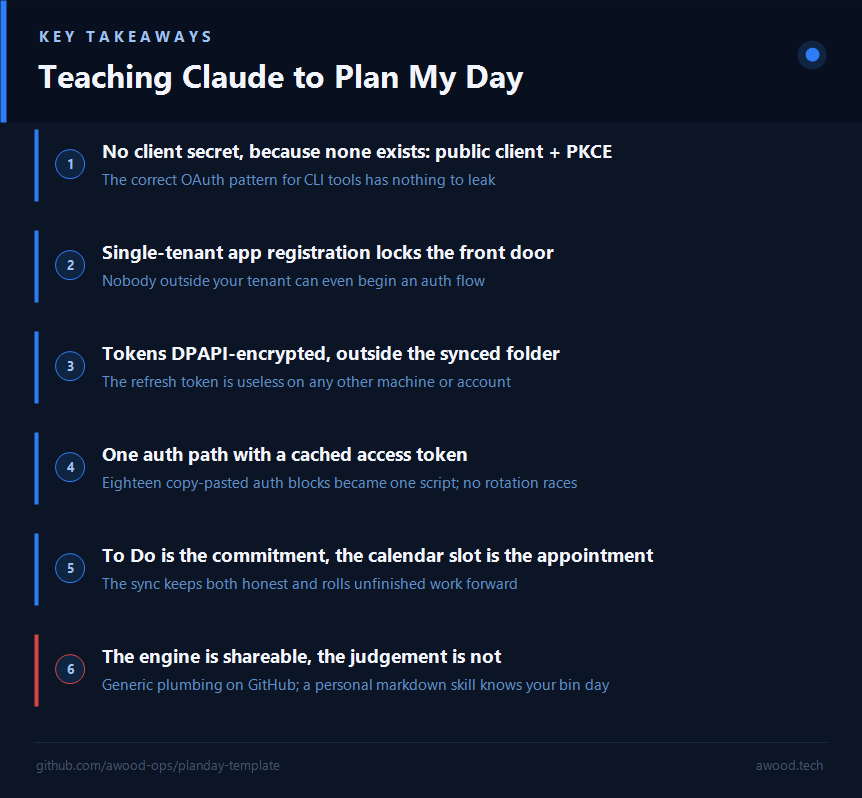
The app registration is a public client using the authorization code flow with PKCE. That’s the correct pattern for CLI tools, and it has a property people find surprising: there is no client secret. None exists, so none can leak. The Client ID and Tenant ID that live in my config file are not secrets; they’re visible in every token request anyway.
The setup is one script that registers the app via the Azure CLI:
pwsh -File scripts\setup-graph-app.ps1 -TenantId <your-tenant-guid>
It creates the app single-tenant (AzureADMyOrg), which means nobody outside my own tenant can even begin an auth flow against it, and registers a http://localhost:8085 loopback redirect. Then a one-time interactive sign-in:
pwsh -File scripts\authenticate-graph.ps1
That opens a browser, catches the callback on localhost, and exchanges the code for tokens. The refresh token, the only real secret in the whole system, is encrypted with Windows DPAPI scoped to my user account and stored in %LOCALAPPDATA%, pointedly not in the OneDrive-synced folder where the scripts live. Copy that file to another machine and it’s noise.
From then on, every script gets its token from one place:
$accessToken = & "$PSScriptRoot\get-graph-token.ps1"
$h = @{ Authorization = "Bearer $accessToken"; "Content-Type" = "application/json" }
That helper caches the short-lived access token (also DPAPI-encrypted) and only refreshes when it’s nearly expired. This matters because the morning pipeline runs several scripts in parallel, and you don’t want them racing each other to rotate the same refresh token.
I’ll be honest: it didn’t start this tidy. Before writing this post I asked Claude to security-review the setup, and we found the app was multi-tenant when it had no reason to be, and the token-refresh code had been copy-pasted into eighteen scripts, one of which had drifted. An hour later the app was single-tenant, the endpoints were tenant-specific, and the auth code lived in exactly one file. If you take one thing from this section: do the review before the blog post, not after. It’s the same shift-left instinct I bang on about for firewall rules; feedback is cheapest before anything ships.
The Engine: PowerShell Against Microsoft Graph
The scripts themselves are deliberately boring, and that’s a compliment. A few highlights:
create-todo.ps1/update-todo.ps1: task CRUD with due dates, reminders, recurrence, and partial-title matching so "mark the firewall one done" works. Most of my tasks don’t start at a keyboard at all: an iPhone Shortcut takes a voice note and drops it straight into To Do, so capturing a task is just talking at my phone while the thought is still warm.get-todo.ps1: fetches everything incomplete and writes a markdown file for the day, which is what Claude actually reads.sync-tasks-to-calendar.ps1: the interesting one. Every task due today gets a calendar event tagged "PlanDay": an hour for high-importance tasks, thirty minutes for normal ones, placed after work hours on weekdays and anywhere on weekends, flowing around blocked-out time like meetings. Unfinished tasks from yesterday roll forward. Slots for completed tasks are deleted.sync-birthdays.ps1: scans the calendar a year ahead and creates a reminder task a week before each birthday (it also knows about Father’s Day and the movable feast that is UK Mothering Sunday).get-bin-schedule.ps1: calls York Council’s waste API and turns bin collections into tasks with a 7am reminder. Your council will have something similar; the pattern is the point, and the repo README walks through pointing it at your own council (or anything else with a date and a description).daily-sync.ps1: runs the whole pipeline, and a Task Scheduler registration script fires it at 07:55 every morning so the plan already exists before I’ve found my glasses.
One design decision people question: tasks exist in To Do and as calendar events. Isn’t that duplication? It isn’t. They do different jobs. The To Do task is the commitment; the calendar slot is the appointment with myself to honour it. The list is where things are captured and ticked off; the calendar is the only place where "I’ll do it today" has to negotiate with reality. The sync keeps them consistent so I never have to. And not everything earns a slot: a task like "check the school email" gets a reminder only, because reading one email doesn’t need a protected half hour.
The Skill: Where It Gets Personal
The layer on top is a single markdown file, a Claude Code skill, and it’s where the system stops being generic plumbing and starts being mine. It tells Claude to run the sync scripts, read the day’s file, and then apply judgement the scripts can’t:
- My wife’s calendar is authoritative for family events. If the same event exists in both our calendars with different times, hers wins, and Claude patches mine to match without being asked.
- Leeds United home games generate travel blocks (leave York two hours before kick-off, back an hour after full time), shown in the briefing as "🚗 Leave York by 13:00".
- The barber is closed on Wednesdays, so don’t suggest a haircut slot on a Wednesday.
- Voice-transcribed tasks get tidied ("Saw robo vacuum no go areas" becomes "Sort Robot Vacuum no-go areas", after checking with me).
None of that belongs in a public repo, and that’s the thesis of this whole project: the engine is shareable, the judgement isn’t. The valuable part of /plan-day is not the PowerShell; it’s a markdown file describing what a good day looks like in my house. Yours would be different, and writing it is the fun part.
A Morning Now Looks Like This
At 07:55 Task Scheduler runs the pipeline. At 08:00 I ask Claude to plan my day and get something like:
Saturday 5 July
- 🗑️ Recycling + garden bin Thursday
- ⚽ No match today
- 09:30–10:00: Clean the car
- ⏰ 16:00: Blog draft reminder
- Rolled forward from yesterday: watch football documentary, bathroom ceiling (sand and fill)
Tasks I finish disappear from tomorrow. Tasks I don’t finish follow me, politely but persistently.
Why This Matters
The interesting thing here isn’t any individual script; it’s the split. A generic, security-conscious engine that any script or AI assistant can drive, and a personal layer that costs nothing to write because it’s just prose. When people talk about "AI agents running your life", this is what it actually looks like in practice: not magic, just good plumbing with a well-written brief on top. It’s the same pattern as scraping my certifications out of MS Learn: when there’s no product feature for your particular bit of life admin, build the plumbing yourself.
The engine (auth scripts, task and calendar sync, the daily pipeline, with all the personal parts stripped and gitignored) is on GitHub: awood-ops/planday-template. Register the app, sign in once, and then go and write the markdown file that knows your bin day.