
A customer who "just wants a Fabric capacity" still gets a full Azure subscription, with everything that implies. A platform landing zone is the right foundation for a lot of organisations, and once you’re onboarding workload after workload it earns its cost fast. For a customer whose entire Azure footprint is one Fabric capacity, it doesn’t, and that’s a legitimate call, not a shortcut. What isn’t legitimate is treating "we don’t need the platform tier" as "we don’t need governance", and that’s the substitution I keep seeing people make without noticing.
A few weeks back, writing about deployment stacks, I said landing zone governance was a big enough topic to deserve its own post and that building one properly was on the list. It still is: this post covers one corner of it rather than the whole thing, and the scenario that pushed this corner to the front of the queue is one I keep running into: a customer doesn’t want an Azure estate, they want Microsoft Fabric. Analytics, a lakehouse, maybe Power BI on top, paid for through a Fabric capacity. They’ve heard "landing zone" and pictured a hub-and-spoke network, an Azure Firewall, a connectivity subscription, and a management group hierarchy someone has to own forever. For an organisation with real multi-workload scale, that apparatus is the right answer. For one workload, it isn’t, and they’re right to push back on it.
The mistake is concluding from there that they don’t need any governance at all. A subscription with a Fabric capacity in it is not a toy environment. It has Owner-capable RBAC the moment it’s created, no cost ceiling until someone sets one, and the workspaces assigned to that capacity start holding real data the day the first source gets connected. "No platform landing zone" and "no governance" are two different sentences, and the conversation usually collapses them into one.
So I built the thing and tried to break it. Most of what follows is from a real subscription, and one of the results answers a question I couldn’t find answered anywhere.
What Microsoft actually means by "landing zone"
The Cloud Adoption Framework definition (refreshed 26 August 2026) is more precise than the term’s reputation suggests. An Azure landing zone has exactly two components:
- Platform landing zone: "the centralized foundation that establishes governance, security, and shared resources for all your Azure workloads." Most organisations should have exactly one per Microsoft Entra tenant.
- Application landing zone: "the environments where workload teams deploy and operate workload resources within the guardrails of the platform landing zone."
The part that matters for a single-workload customer is what CAF says the platform tier actually is: a management group hierarchy, plus optional centralised resources. On those resources the framework is explicit:
"Many organizations provide certain capabilities centrally so every workload can use the same approved services and standards… What you centralize depends on your requirements. Only centralize capabilities that provide clear governance, operational, or economic benefits across multiple workloads."
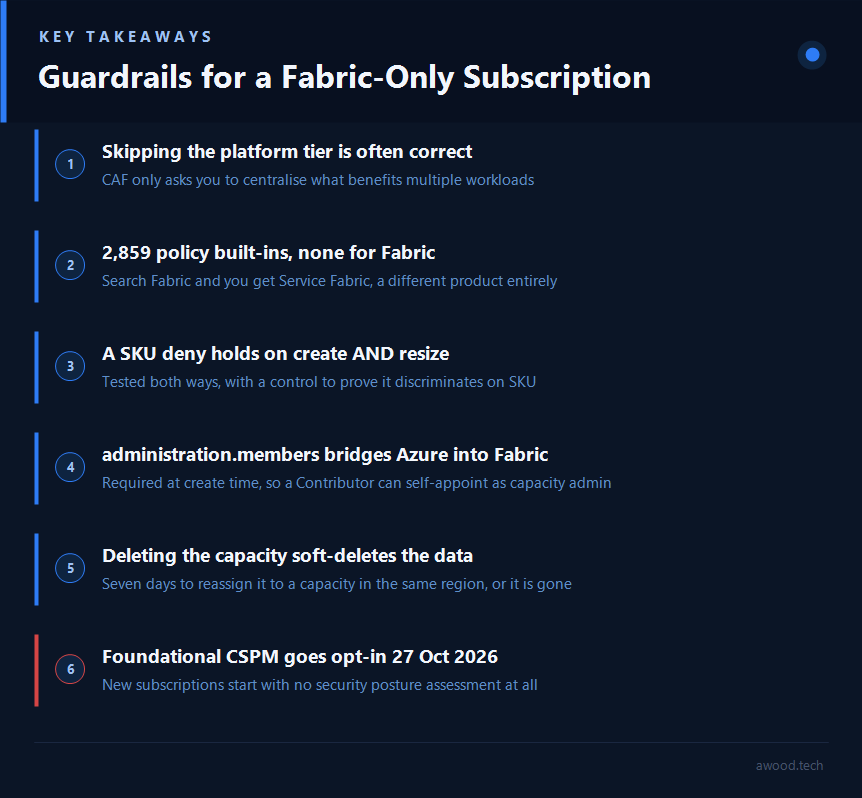
That last clause is doing the work. Connectivity hubs, centralised Sentinel, shared identity services: all of it earns its cost across multiple workloads. A single Fabric capacity is, by definition, not that. Nothing in CAF requires the platform tier before you’re allowed to have guardrails. It requires the platform tier before centralising something makes economic sense.
What CAF doesn’t say is "so skip the rest too." The platform tier and the guardrails are two separate decisions, and the whole point of this post is to test what’s actually available when you keep the second and drop the first.
This post sticks to the workload as it stands today: a Fabric capacity, some workspaces, real data. The moment Copilot in Fabric or a model behind Microsoft Foundry lands on top of it, the guardrail surface changes again, and Microsoft ships a whole separate accelerator for that scenario. That’s enough ground for its own post, and it’s next on the list.
Guardrails work fine at subscription scope, and here’s the proof
Everything below was assigned at plain subscription scope. No management group, no hierarchy, no platform tier.
First, an unwelcome discovery about Fabric
Before assigning anything I went looking for built-in policy. Azure Policy currently ships 2,859 built-in definitions in my tenant. The number targeting Microsoft.Fabric:
$ az policy definition list --query "[?policyType=='BuiltIn' && contains(to_string(policyRule),'Microsoft.Fabric')]"
(empty)
Zero. Search the built-ins for "Fabric" by display name and you get three results, all of them Service Fabric, a completely different and much older product. Microsoft’s own Fabric security baseline confirms it by omission: under "AM-2: Use only approved services" it can only offer "Use Azure Policies to control who can provision Fabric capacities" and link to the generic deny-a-resource-type built-in. There is no Fabric-specific definition to point at.
So anything you want, you write yourself. Which raises the obvious question: how much of a Fabric capacity can Azure Policy even see?
The complete alias list
I couldn’t find this published anywhere, so here it is in full. Every property of Microsoft.Fabric/capacities that Azure Policy can address:
$ az provider show --namespace Microsoft.Fabric --expand "resourceTypes/aliases" \
    --query "resourceTypes[?resourceType=='capacities'].aliases[].name" -o tsv

Microsoft.Fabric/capacities/provisioningState
Microsoft.Fabric/capacities/state
Microsoft.Fabric/capacities/administration
Microsoft.Fabric/capacities/administration.members
Microsoft.Fabric/capacities/administration.members[*]
Microsoft.Fabric/capacities/sku
Microsoft.Fabric/capacities/sku.name
Microsoft.Fabric/capacities/sku.tier
Eight aliases, and functionally only three things: what size it is, what state it’s in, and who administers it. Plus the universals every resource has (location, tags, name). That’s the entire governable surface. Everything that actually matters in Fabric, meaning workspaces, data, sharing, tenant settings, is invisible to Azure Policy. The Azure control plane governs the wrapper, not the workload. Worth knowing before you promise a customer "we’ll govern it with policy."
The SKU guardrail, and the question nobody had answered
sku.name is the useful one, because nothing stops someone provisioning an F1024 by mistake and an F64 is already around £7,200/month at UK South list rates. A minimal deny:
{
  "if": {
    "allOf": [
      { "field": "type", "equals": "Microsoft.Fabric/capacities" },
      { "not": { "field": "Microsoft.Fabric/capacities/sku.name",
                 "in": "[parameters('allowedSkus')]" } }
    ]
  },
  "then": { "effect": "deny" }
}
Assigned at subscription scope with an allowlist of F2 through F64. Creating an F128 gets refused, and the error is genuinely informative:
ERROR: Forbidden - RequestDisallowedByPolicy
"evaluatedExpressions": [
  { "result": "True",  "expression": "type",
    "expressionValue": "Microsoft.Fabric/capacities", "operator": "Equals" },
  { "result": "False", "expression": "Microsoft.Fabric/capacities/sku.name",
    "expressionValue": "F128",
    "targetValue": ["F2","F4","F8","F16","F32","F64"], "operator": "In" }
]
Good. But create-time deny is the easy half, and it’s the half everyone demonstrates. The question I actually wanted answered, and could not find answered anywhere: does that deny survive a resize? Because if it doesn’t, the guardrail is decorative. Someone provisions a compliant F2 on Monday, scales it to F1024 on Tuesday through the Fabric portal’s Change size dialog, and your cost control never fires.
So I created an F2 (allowed, provisioned fine), waited for it to go Active, and issued a PATCH to F128:
$ az rest --method patch --url ".../capacities/fabguardlab01?api-version=2023-11-01" \
    --body '{"sku":{"name":"F128","tier":"Fabric"}}'

ERROR: Forbidden - RequestDisallowedByPolicy
  "expressionValue": "F128",
  "targetValue": ["F2","F4","F8","F16","F32","F64"]
The resize is blocked. The guardrail holds on both create and update.
One more step, because a result like that needs a control. If the policy were simply rejecting every PATCH, I’d have drawn the wrong conclusion entirely. So I resized the same capacity to F4, which is inside the allowlist:
$ az rest --method patch ... --body '{"sku":{"name":"F4","tier":"Fabric"}}'
fabguardlab01   F4   Preparing
Succeeded. The policy is checking the SKU value, not blocking updates wholesale. So a sku.name deny is a real cost ceiling on a Fabric capacity, at plain subscription scope, with no management group anywhere near it. That is the post’s central claim, tested rather than asserted.
(The capacity was deleted immediately afterward. An F-SKU bills per second from the moment it exists.)
The other alias worth using: who administers the capacity
sku.name gets all the attention, but administration.members[*] is the more interesting one, because of what the ARM schema forces. properties.administration.members is required at create time. That means anyone holding plain Contributor on the subscription can create a Fabric capacity and name themselves capacity admin in the same call, holding no Fabric role whatsoever. It is the bridge from the Azure control plane into the Fabric one, and it’s a single line of JSON.
Policy can see it, using a count expression:
{
  "allOf": [
    { "field": "type", "equals": "Microsoft.Fabric/capacities" },
    {
      "count": {
        "field": "Microsoft.Fabric/capacities/administration.members[*]",
        "where": {
          "field": "Microsoft.Fabric/capacities/administration.members[*]",
          "notLike": "[concat('*@', parameters('allowedAdminDomain'))]"
        }
      },
      "greater": 0
    }
  ]
}
Creating a capacity with an admin outside the tenant domain is refused, and the evaluation shows the count doing the work:
"expression": "Microsoft.Fabric/capacities/administration.members[*]",
"expressionValue": 1, "targetValue": 0, "operator": "Greater"
Same discipline as before: the control, an identical capacity with an in-domain admin, provisioned fine. So the policy is checking the admin’s domain, not blocking capacities generally.
The guardrail I’d argue hardest for, which isn’t on the usual list
A subscription bought for Fabric has no business running virtual machines. That sounds like a tidiness point until you read Microsoft’s Defender Experts write-up of the "cloud shadows" campaign, running since June 2025, which targets accounts that are "improperly secured and poorly monitored" with "no active security monitoring or Defender for Cloud subscription". Initial access is AiTM or password spray; from there the attackers weaponise ephemeral resources and manipulate quotas. Compute is the payload, and an unmonitored subscription with spare quota is the product.
The built-in Not allowed resource types (6c112d4e-5bc7-47ae-a041-ea2d9dccd749) removes that entire class of abuse in one assignment:
listOfResourceTypesNotAllowed = [
  "Microsoft.Compute/virtualMachines",
  "Microsoft.Compute/virtualMachineScaleSets",
  "Microsoft.ContainerService/managedClusters",
  "Microsoft.Batch/batchAccounts",
  "Microsoft.ClassicCompute/virtualMachines"
]
Tested by trying to create a VM, which was refused, and refused twice over: ARM’s response carried two separate PolicyViolation blocks in the same error, one for the disallowed resource type and one for a missing Owner tag from a second policy assigned alongside it. Worth knowing when you’re debugging a deployment failure: ARM reports every violation it finds in one go, not just the first, so you get the whole list rather than a game of whack-a-mole. It costs nothing, it never fires in normal operation for this customer, and it means a stolen credential can’t turn the subscription into someone’s mining rig. For a single-purpose data subscription I’d assign it before almost anything else.
Rounding out the set
Two more built-ins, both assigned at subscription scope and both tested:
- Allowed locations (
e56962a6-4747-49cd-b67b-bf8b01975c4c), restricted to UK South and UK West. A storage account in East US was refused; the same account in UK South went through, though not cleanly, it then failed onMicrosoft.Storagebeing unregistered on the subscription. That’s a useful ordering to know: Azure Policy evaluates before the resource provider registration check does, so a policy pass doesn’t mean the request actually got anywhere yet. - Require a tag on resources (
871b6d14-10aa-478d-b590-94f262ecfa99), for anOwnertag.
Worth being precise about what "restricted to UK South and UK West" actually buys, given how live data sovereignty is right now for UK public sector customers. This is a residency control: it fixes where the data physically sits. Microsoft’s own Sovereign Cloud documentation draws a real line between that and full sovereignty, which additionally covers who can access the data and under what legal authority, delivered through a separate bundle of controls (a Sovereign Landing Zone, customer-managed keys, confidential computing), not a location restriction on its own. If the ask goes further than residency, to demonstrating alignment with the NCSC Cloud Security Principles for a public sector assessment, Azure Policy already has the built-in regulatory compliance initiative for it, UK OFFICIAL and UK NHS, mapped control by control to CSPs covering data-in-transit protection, identity and authentication, and data-at-rest protection. That’s the initiative to assign rather than hand-rolling the equivalent from individual policies.
Worth knowing about that last one before you assign it: it applies to the Fabric capacity too, so the tag becomes mandatory on the exact thing the customer came for. Assign it on its own and you’re just blocking people. Pair it with Inherit a tag from the resource group (cd3aa116-8754-49c9-a813-ad46512ece54), which uses a Modify effect to supply the tag rather than refuse the request.
The guardrails worth having anyway
Beyond policy, at subscription scope, none of which needs a platform tier:
Identity. No standing Owner. CAF calls identity "a primary security boundary in the public cloud", and that sentence has no platform-tier prerequisite attached. The damage delta between "Owner on the subscription" and "Contributor plus a scoped custom role" is almost entirely the ability to rewrite the access graph and make it durable: Owner is Contributor plus Microsoft.Authorization/*, so an Owner can assign themselves or anyone else any role at any scope, mint privileged custom roles, and hand roles to external guests. Everything else an attacker wants, Contributor already grants.
Microsoft makes this argument better than I can, in the Fabric docs themselves. The pause/resume page lists the four actions needed to pause a capacity and then says of the built-in roles that include them: "using those roles isn’t recommended because they grant more permissions than necessary."
Worth being precise about the boundary, because it’s commonly got wrong in both directions: a subscription Owner cannot touch your Entra tenant. Per Microsoft, "Microsoft Entra role assignments do not grant access to Azure resources, and Azure role assignments do not grant access to Microsoft Entra ID." The escalation runs the other way, via a Global Administrator toggling "Access management for Azure resources" to grant themselves User Access Administrator at root scope.
Cost, with an important caveat. Set a budget with an action group. But be clear what it is: Azure budgets are notification-only. They do not stop spend. In an otherwise ungoverned subscription the only genuinely preventative cost control is a policy on resource types and SKUs, which is exactly why the resize result above matters.
Resource locks. CanNotDelete on the capacity. Trivial, and it’s the one guardrail that survives someone having more RBAC than they should.
Subscription transfer settings, and this one changed recently. Most hardening checklists still tell you to set "Subscriptions leaving a Microsoft Entra ID directory" to permit no one, as though it were an insecure default. As of 1 May 2026 Microsoft flipped it: both the leaving and entering policies now default to "Allow no users". The modern check isn’t "set it", it’s "has anyone changed it, and who is on the Exempted Users list?" Note that non-global-admins can’t see that list at all, "for privacy reasons".
The part specific to Fabric: two control planes, one of which Azure can’t see
Fabric’s governance surface lives substantially outside the Azure portal, and the split is sharper than people expect.
We’ve already seen the bridge running one way: properties.administration.members lets a subscription Contributor install themselves as capacity admin at create time. The reverse is just as stark. A subscription Owner cannot read a single row of data. Fabric evaluates access as Entra authentication, then Fabric access, then data security, and workspace roles are the gate. Owner on the capacity grants no workspace role at all.
That cuts both ways, and the destructive direction is worse. Delete the capacity from Azure and the non-Power BI Fabric items in its workspaces are soft-deleted, restorable only if reassigned to a capacity in the same region within seven days. An Azure-plane Contributor with no Fabric role at all can take out the data platform, and you have a week to notice.
Three more things that live entirely on the Fabric side, invisible to Azure Policy and to Cost Management until the invoice arrives:
- Capacity overage (preview) is set by a capacity admin from the Fabric portal as a 24-hour CU-hour limit, and Fabric bills it at exactly three times the pay-as-you-go rate. Verified against the retail price meters: £0.1546/CU-hour, with the overage meter billing at precisely three times that, £0.4638/CU-hour, in UK South.
- Pausing doesn’t cleanly stop the bill. Per Microsoft: "When you pause your capacity, the remaining cumulative overages and smoothed operations on your capacity are summed, and added to your Azure bill." Pause crystallises the debt rather than avoiding it. OneLake storage keeps billing regardless, on separate meters.
- Trial capacities produce no ARM resource at all, so they’re outside Azure Policy, Cost Management and Defender for Cloud entirely.
On networking, the two scopes are tenant-level private links (all workspaces) and workspace-level (one workspace at a time, gated behind a Fabric admin enabling the "Configure workspace-level inbound network rules" tenant setting). Limits worth knowing: 500 workspace private link services per tenant, 100 private endpoints per workspace, and one PLS per workspace. The portal UI cannot enable inbound and outbound protection on the same workspace simultaneously; doing both requires the Workspaces – Set Network Communication Policy API.
And two holes in that model that deserve more attention than they get. Admin APIs, on admin/workspaces/{workspaceId}, are not covered by workspace-level private links and remain reachable even for a restricted workspace. Neither is the network communication policy API itself, which stays accessible from public networks even when public access to the workspace is blocked, meaning a workspace admin can undo the lockdown over the internet.
One tenant setting is dangerous by default and worth checking today: "Service principals can call Fabric public APIs" is documented as enabled by default for new customers. Also worth an audit is external data sharing, where Microsoft is candid that "governance controls from the provider tenant don’t flow across tenant boundaries" and "the sharer can’t control who has access to the data in the consumer’s tenant." The permission needed is ordinary Read and Reshare, not admin. A workspace Member can hand your lakehouse to another tenant and no Azure-side control will see it.
The date to put in your calendar
The strongest argument for doing this now, rather than when it becomes a problem, is a deadline. Foundational CSPM, the free Defender for Cloud posture tier that everyone quietly relies on as the accidental guardrail in an ungoverned subscription, changes on 27 October 2026:
"Starting October 27, 2026, Foundational CSPM will move to an opt-in model for new Azure subscriptions and will no longer be enabled by default."
Existing subscriptions keep it. New ones start with it off. From that date, a fresh Fabric subscription with no landing zone and nobody thinking about governance has no security posture assessment at all until somebody deliberately turns it on.
Two clarifications while we’re here, because both get overstated. Free Foundational CSPM is scoped to recommendations and a secure score, and the threat detections people assume they’re getting, the Defender for Resource Manager alerts that fire on suspicious compute creation or an anomalous role assignment, sit behind a paid plan. And Defender CSPM’s billable resource types cover VMs, storage accounts and various SQL/Synapse resources. Microsoft.Fabric/capacities isn’t among them. Synapse, Fabric’s predecessor, is covered. Fabric isn’t.
What changes once there’s more than one capacity
Everything above assumes the customer has exactly one Fabric capacity in one subscription, which is often true on day one and rarely stays true for long. Dev, test and production capacities frequently end up in separate subscriptions for cost isolation and blast radius on their own, and a business with more than one team running its own analytics can end up with several Fabric subscriptions before anyone’s called it an estate.
That doesn’t automatically mean the full platform landing zone. CAF’s own definition of the platform tier is a management group hierarchy plus optional centralised resources, and those are two different costs. The hub network, Azure Firewall, connectivity subscription and centralised Sentinel are the expensive half, and they stay optional regardless of how many Fabric subscriptions exist. A bare management group with the SKU deny, the admin-domain deny and the compute deny assigned once at the group, inherited by every Fabric subscription underneath it, is a real, working slice of the platform tier. It costs nothing beyond the time it takes to create the group and re-point the assignments from subscription scope to management group scope, which is a one-line change to each assignment’s --scope.
Worth being precise about what that buys and what it doesn’t. Policy inheritance through a management group is consistent enforcement across subscriptions, not centralisation of anything a workload team would need to ask for. Nobody’s sharing a hub network or a firewall, and no connectivity subscription appears. It’s the governance half of the platform tier, adopted early, without the infrastructure half that makes the full thing expensive. If a customer is likely to end up with three or four Fabric subscriptions within a year, building that management group on day one, even an empty one with nothing on it but the policy assignments from this post, is worth doing before the second subscription exists rather than retrofitting consistent policy across two or three subscriptions that have already drifted apart by hand.
Why This Matters
"Do we need a landing zone" and "do we need guardrails" get asked as one question, and CAF itself doesn’t force them together. The platform tier exists to centralise what benefits multiple workloads, and a single Fabric capacity fails that test on its own terms. Turning it down isn’t a governance shortcut, it’s the framework working as designed, and the moment a second Fabric subscription shows up, the management group half of that same framework is available on its own, well before the hub network and firewall half would earn its cost.
The failure mode is letting "we don’t need the platform tier" get heard as "we don’t need policy, an identity boundary, a cost ceiling, or ten minutes in the Fabric admin portal." Those cost an afternoon rather than a hub network. And on the evidence above they work. Five assignments at plain subscription scope, no management group anywhere: a SKU deny that held against both a create and a resize, an admin-domain deny on the one alias that bridges Azure into Fabric, a resource-type deny that takes cryptomining off the table, plus locations and tags. That is perhaps an hour of work, and the first two are the controls standing between a customer who "just wants Fabric" and a five-figure surprise.
What I’d genuinely worry about isn’t the customer who decides against a platform landing zone, that’s a real decision, made with the trade-offs in view. It’s the customer who never has the conversation at all: a subscription gets created, a Fabric capacity goes in, and nobody ever asks whether it needs guardrails until something has already gone wrong.
Leave a Reply